.png)
In addition to large language models, the OpenAI team also develops AI image generator models. The latest AI image generator model developed and released by OpenAI is the ChatGPT Images 2.0 model. ChatGPT Images 2.0 allows users to generate higher-quality images and offers new aspect ratios such as 3:1 and 1:3. If you're wondering what ChatGPT Images 2.0 is, we've got you covered!
In this article, we will examine the ChatGPT Images 2.0 model and its features.
TL; DR
OpenAI's ChatGPT Images 2.0 is its latest AI image generator, offering higher-quality output, improved text rendering, and new aspect ratios including 3:1 and 1:3. It outperforms its predecessor in prompt following, multilingual text support (including non-Latin alphabets like Chinese, Japanese, and Hindi), realistic styles, and knowledge current through December 2025. API pricing is $5 per million text input tokens, $8 per million image input tokens, and $30 per million output tokens. The model is accessible via ChatGPT, OpenAI Codex, API, and enterprise platforms like TextCortex. While it generates more creative and independent visuals than before, it still struggles with precise spatial tasks such as origami, knot tying, and map route drawing.
What is ChatGPT Images 2.0?
ChatGPT Images 2.0 is an AI image generator developed by OpenAI that offers users advanced quality, different aspect ratio options, and better image spelling/text rendering. While GPT Image 1 was effective, it lagged behind its biggest competitor, Gemini 3 Pro Image, in text rendering. However, with GPT Image 2, OpenAI managed to continue the competition.
How to Access ChatGPT Images 2?
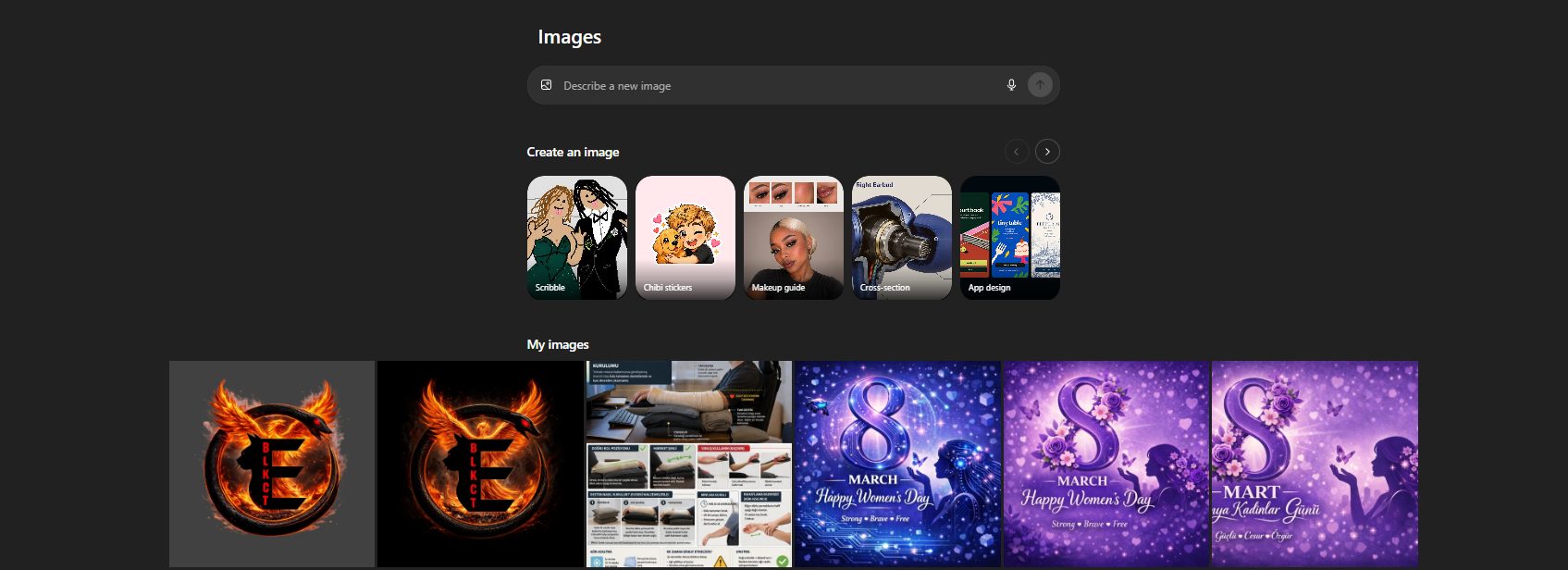
There are three easy and fast ways to access the ChatGPT Images 2 model. The first and easiest method is to use it through the ChatGPT AI chatbot. By entering prompts such as "imagine, create, render" into ChatGPT, you can start generating visual output with the GPT Image 2 model, or you can go directly to the ChatGPT image generator section at chatgpt.com/images. Another way to use GPT Image 2 is the OpenAI Codex.
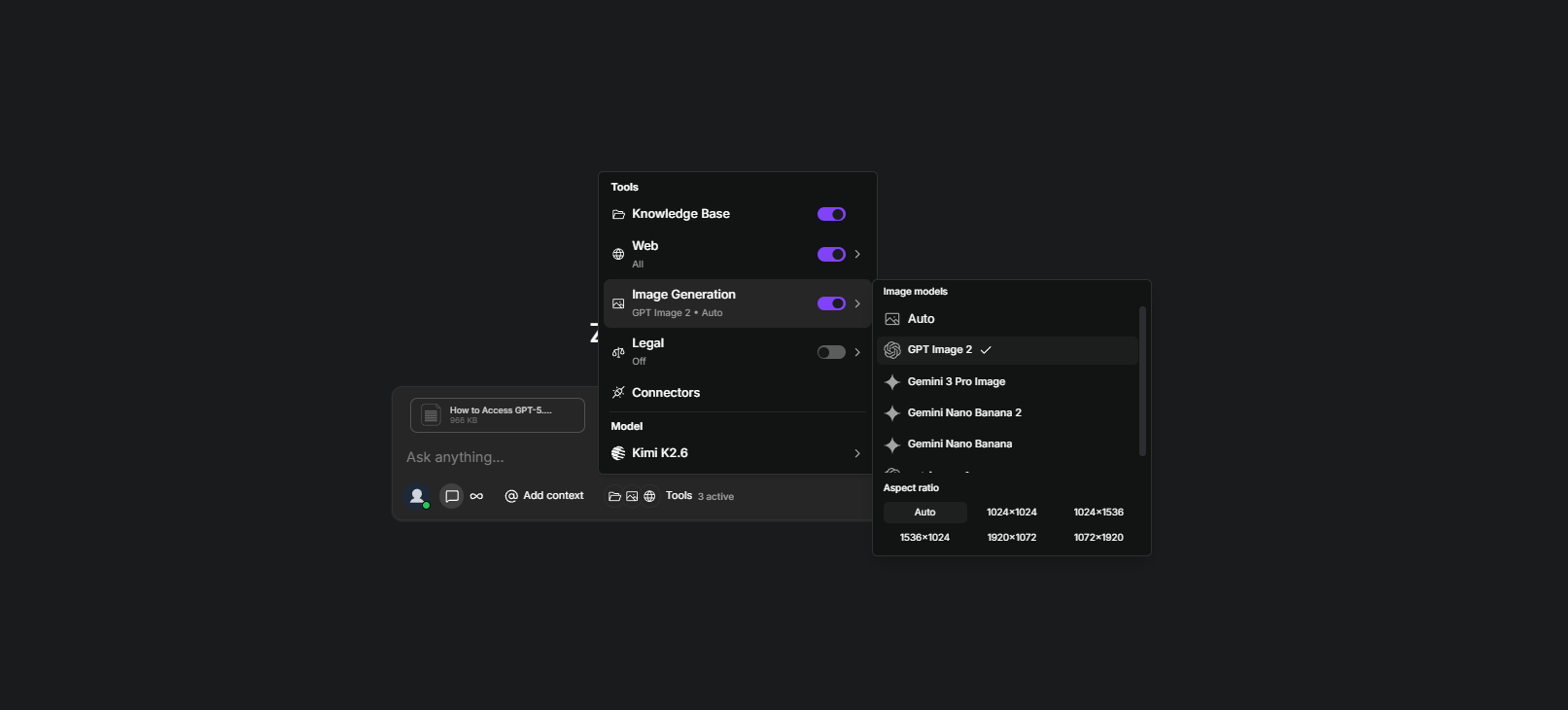
If you want to integrate the GPT Images 2.0 model into your enterprise workflow, TextCortex is the best option for you. TextCortex offers users a wide range of AI image generator libraries, including GPT Images 2. With TextCortex, you can generate images in a conversational format or build AI agents that use AI image generator models. To generate images with TextCortex, all you need to do is head to the TextCortex web application and select the GPT Image 2 model from the chat settings.
ChatGPT Images 2.0 Pricing
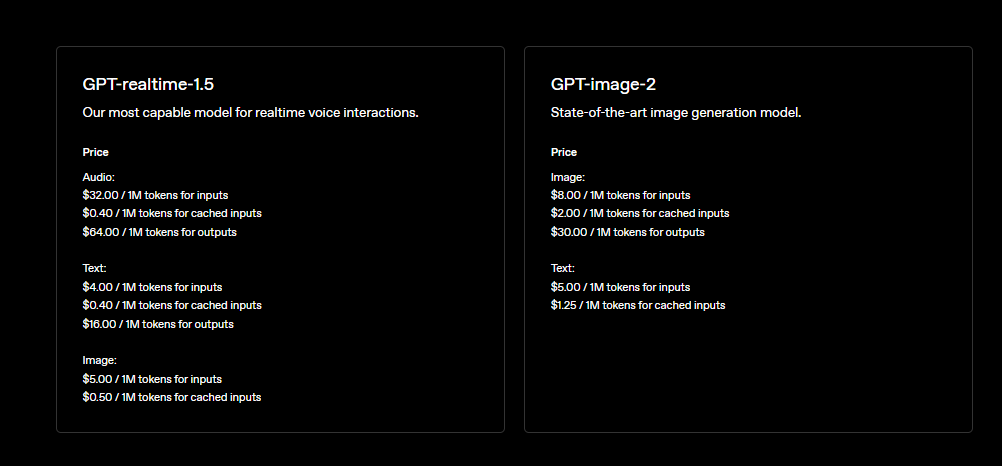
The GPT Images 2 model varies depending on the input and output token usage, the aspect ratio you choose, and the output quality. The basic pricing for the ChatGPT Images 2 model is as follows:
- $8 / 1M tokens for image inputs
- $5 / 1M tokens for text inputs
- $30 / 1M tokens for outputs
ChatGPT Images 2.0 vs Nano Banana 2
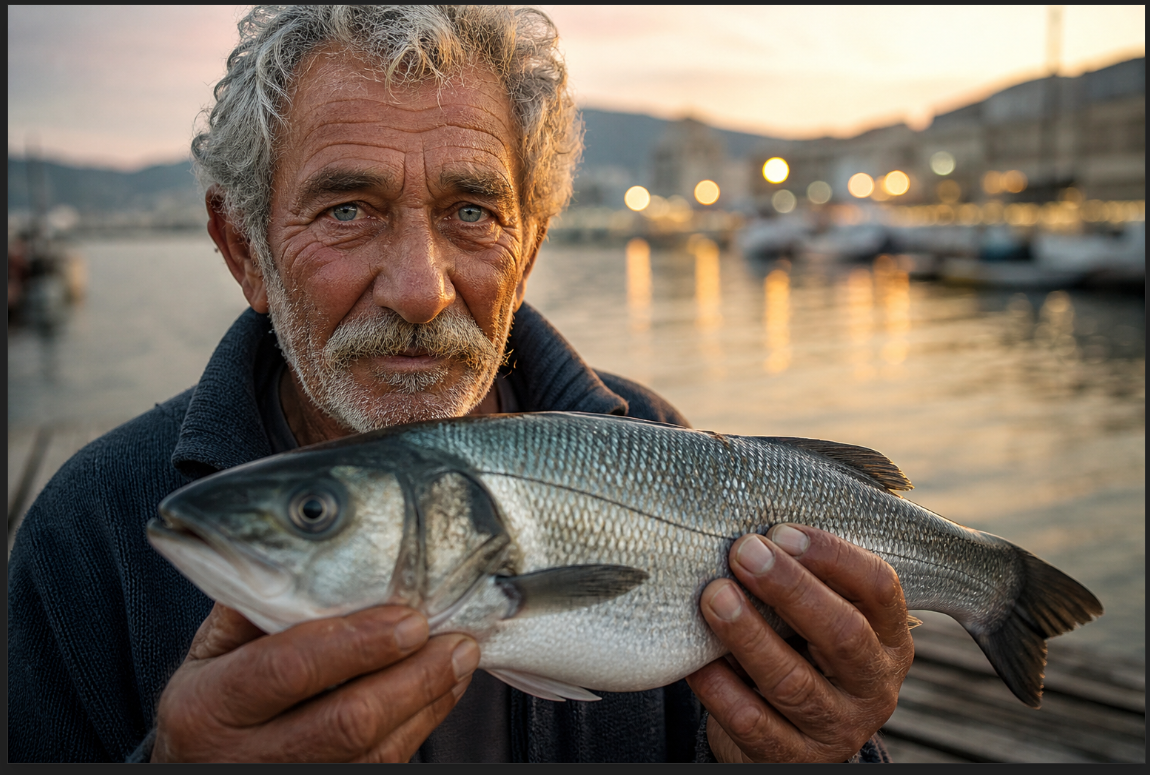
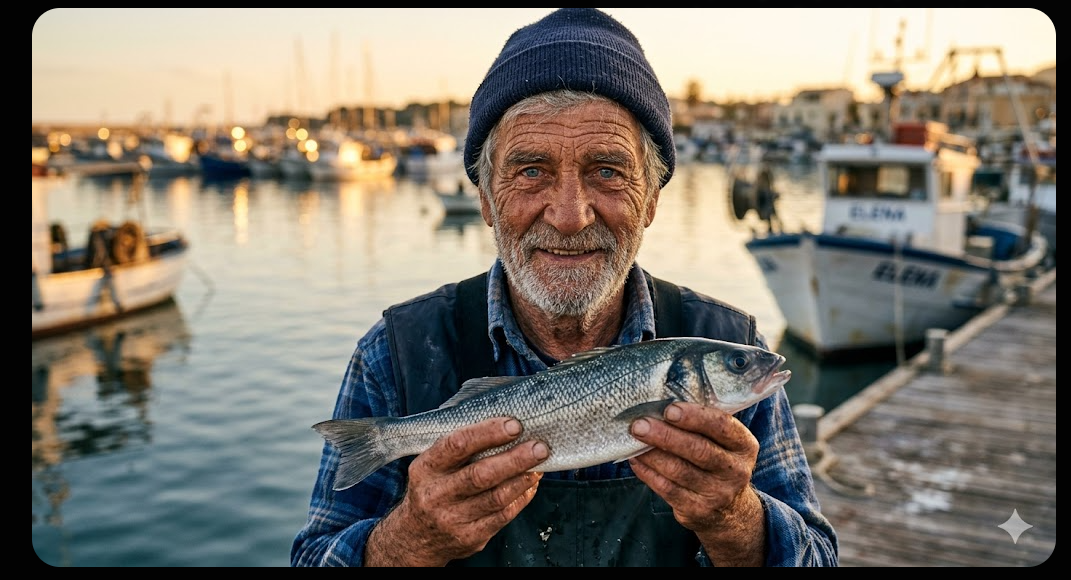
Both ChatGPT Images 2.0 and Nano Banana 2 are among the most advanced AI image generator models. Both models excel at realistic image rendering, text rendering, image spelling, and input following. However, the ChatGPT Images 2.0 model offers more output options with 3:1 and 1:3 aspect ratio choices. For a better comparison, let's test the two models with the same prompt:
A hyper-realistic close-up portrait of an elderly Mediterranean fisherman with weathered skin, deep wrinkles, and piercing blue eyes, holding a freshly caught sea bass on a sunlit wooden dock at golden hour, with bokeh lights from distant boats reflecting on calm water behind him.
ChatGPT Images 2.0 output:
Nano Banana 2 output:
Honest User Review
I frequently use AI image generator models in my professional and daily tasks, including ChatGPT Images 2 and Gemini 3 Pro Image. To be honest, ChatGPT's previous image generator model, Image 2, was more effective. While the previous model fully understood user intent and generated concise output, the current model generates output more creatively and independently. Although this presents a disadvantage for generating the image you have in mind, Image 2 is a good option for those who want to create new and creative visuals. Also, the Gemini 3 Pro model was better at image spelling than the previous ChatGPT model. However, both ChatGPT Images 2.0 and Gemini 3 Pro models perform excellently in image spelling.
ChatGPT Images 2.0 Features
OpenAI has taken AI image generator models to a new level with the ChatGPT Images 2.0 model. Let's take a look at the new features of ChatGPT Images 2.0 together.
Better Prompt Following
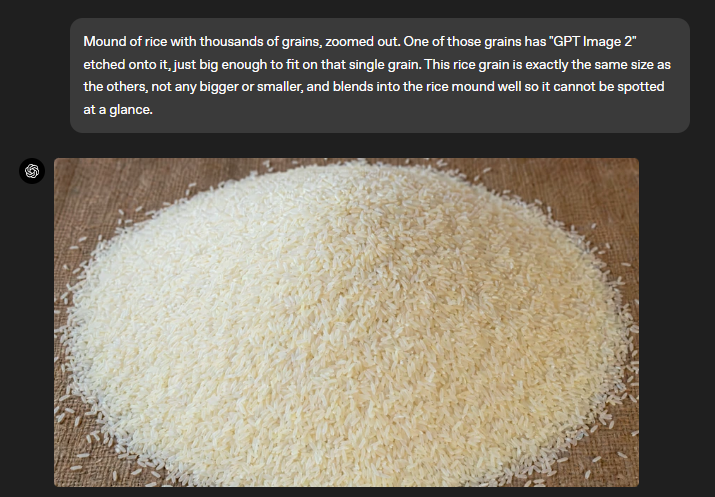
The ChatGPT Images 2.0 model is more successful at following user instructions than its predecessor. It can generate the desired output not only by better analyzing textual prompts but also by better scanning reference images entered as input. In this respect, using the GPT Images 2 model and entering instructions into it is easier and more effective. When using this model, if you clearly describe what you want as output, you will get the desired output.
Multilingual Understanding
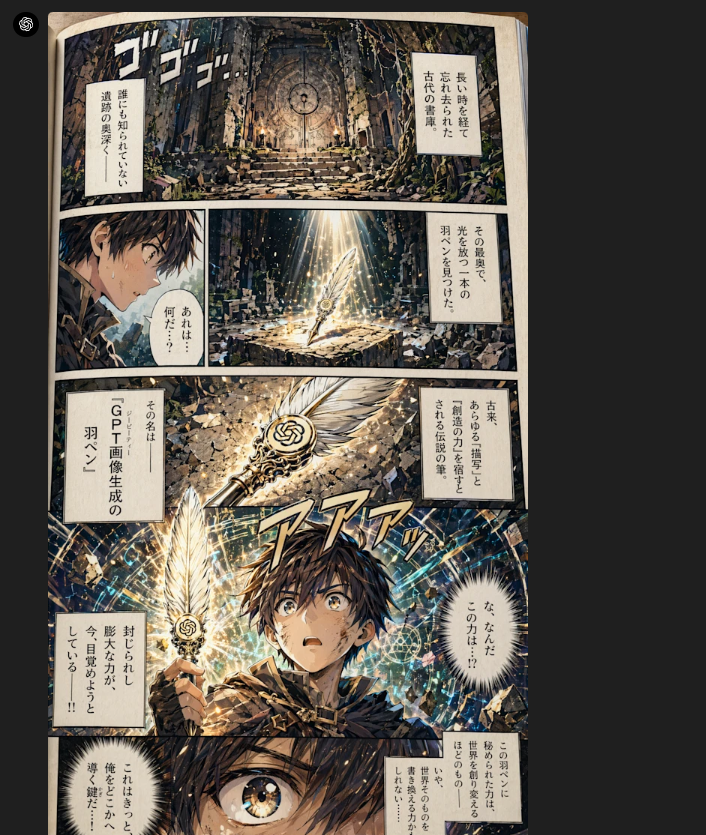
OpenAI's previous model, GPT Images 1, was successful at understanding English input and rendering English text, but it wasn't as successful with other languages, especially those that don't use the Latin alphabet, such as Chinese and Japanese. However, the GPT Images 2 model is better at understanding and rendering text from non-Latin alphabet inputs, including Chinese, Japanese, and Hindi.
Better Styles
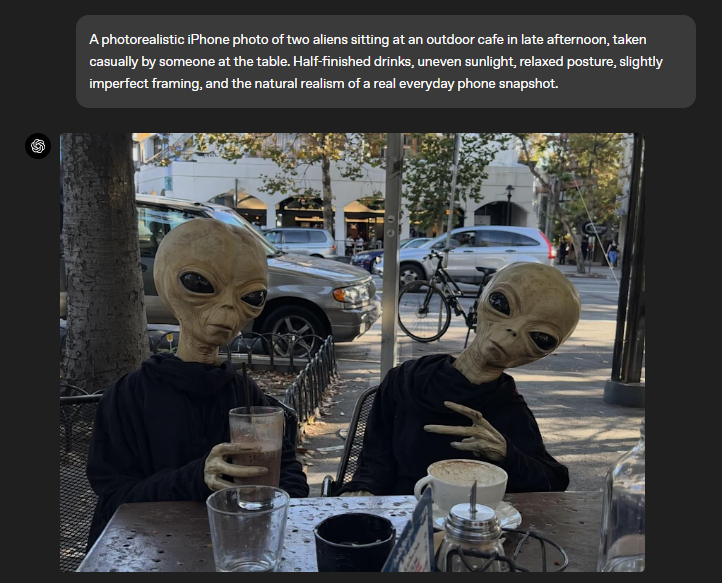
While the GPT Image 1 model can generate output in various artistic styles, the GPT Image 2.0 model takes this a step further by generating styles with higher quality. For example, when you want to generate realistic output with the GPT Image 2 model, you get results closer to real life and what you see with your own eyes. You can use this both for generating posts for your social media platforms and for your realistic works.
More Aspect Ratios
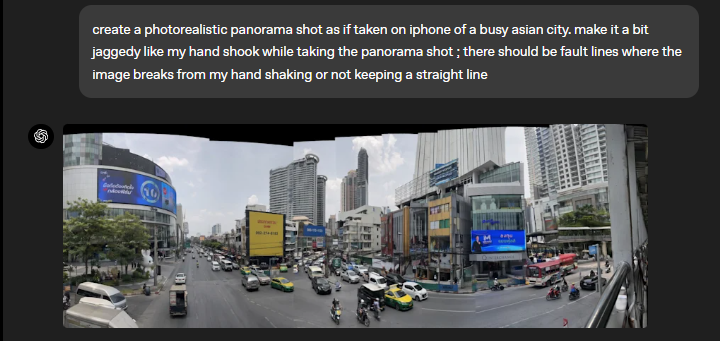
ChatGPT Images 2.0 goes beyond conventional aspect ratios, allowing you to achieve the exact aspect ratios you need. If you require 3:1 or 1:3 aspect ratios for images like comic book pages or vertical advertisements, ChatGPT Images 2.0 is the best option.
Recent World Knowledge
The GPT Images 2.0 model can generate outputs closer to current standards using knowledge and training data up to December 2025. For example, if you want to generate an image of a specific street in a specific country, you can obtain outputs based on images from 2025.
ChatGPT Images 2.0 Limitations
Although the GPT Images 2.0 model offers advanced features, it still cannot precisely generate outputs that require finesse and real-life knowledge, such as origami, shoelace tying, knot tying techniques, and map route drawing. Therefore, generating outputs containing hidden angles, reversed surfaces, and puzzles remains a challenge for GPT Images 2.0.
TextCortex AI: Integrate GPT Image 2 Into Your Enterprise
If you want to integrate advanced AI image generators, including GPT Image 2, into your enterprise and use them for slideshow generation, marketing advertisements, product images, and designs, TextCortex is the solution for you. TextCortex is an Enterprise Agent Infrastructure that allows you to work with your enterprise data and automate both repetitive and complex workflows.
How to use GPT Images 2 via TextCortex?
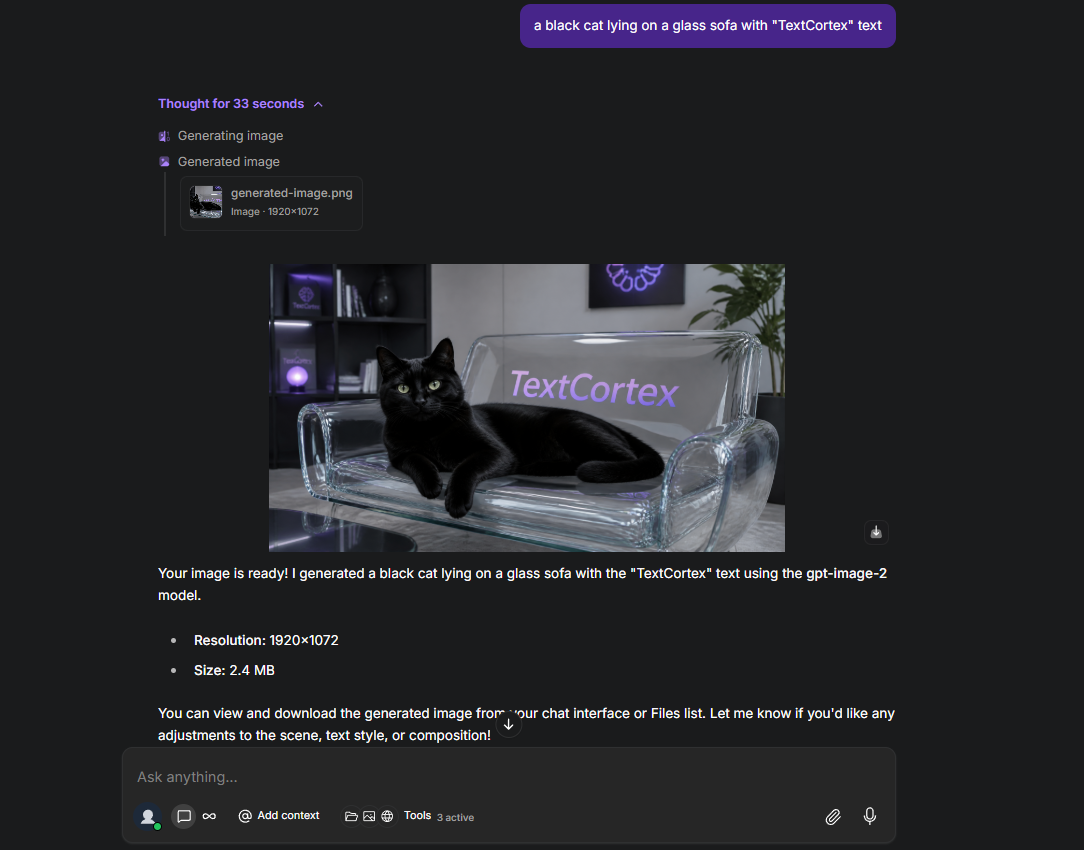
There are two ways to use the GPT Images 2 model via TextCortex. The first method is to head to the TextCortex web application and select the "GPT Images 2" model from the chat settings. Then, simply throw your input into the textbox. TextCortex will analyse your prompts and enhance them to be compatible with GPT Images 2.
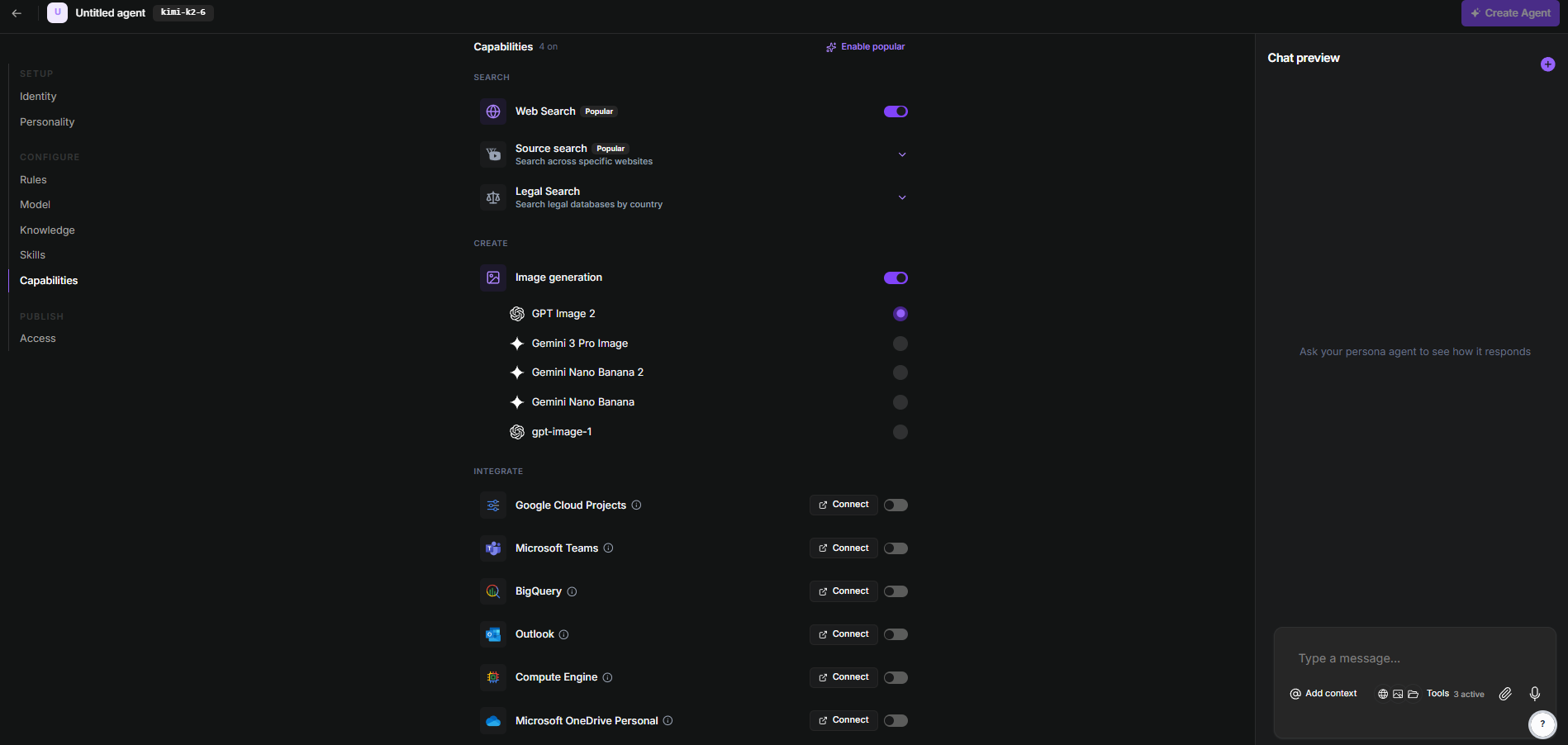
The second way to use the GPT Images 2 model via TextCortex is to turn it into an AI agent. To do this, select "Create Agent" from the right-hand menu in the TextCortex web application, then go to manual creation, enable image generation, and select the GPT Images 2 model.
Frequently Asked Questions
How to use GPT image 2?
To use the GPT image 2 model, you can use the ChatGPT chatbot or access the GPT image 2 model with TextCortex.
Is GPT image 2 out?
The GPT image 2 model was released on April 21, 2026, and with its release, it became available in ChatGPT, Codex, and TextCortex.
What’s the difference between GPT image 1 and GPT image 2?
While the GPT image 1 model struggles to render non-Latin text, the GPT image 2 model can spell non-Latin text, including Chinese and Japanese, into images. Furthermore, the GPT image 2 model offers more aspect ratio options than the GPT image 1 model and produces higher-quality output.
Is GPT image 2 free?
You can use the GPT image 2 model for free via ChatGPT on a limited basis. However, to access its full capabilities, you need to purchase an OpenAI Plus or higher membership.
.png)
.png)
.png)