
.png)
Kimi K2.5 is a multimodal model with agentic capabilities developed by Moonshot AI. Kimi K2.5 supports multimodal input and provides users with a context window of 262k tokens. In addition to reasoning and agentic capabilities, Kimi K2.5 performs well in using tools and managing smaller AI agents. If you're curious about the Kimi K2.5 model and its capabilities, we've got you covered!
In this article, we'll examine the Kimi K2.5 model and explore its features.
Ready?
Let's dive in!
TL; DR
- Kimi K2.5 is a model developed by Moonshot AI that offers advanced agentic capabilities.
- Kimi K2.5 has four sub-models: instant, thinking, agent, and agent swarm.
- Kimi K2.5 offers its users agent swarm, top-tier agentic performance, native multimodality, and a large context window.
- If you want to integrate the Kimi K2.5 model into your enterprise, TextCortex AI is the solution for you.
What is the Kimi K2.5?
Kimi K2.5 is an AI model developed by Moonshot AI that offers users advanced reasoning, multimodality, and strong coding performance. The Kimi K2.5 model is an improved and optimized version of the Kimi K2 model. The Kimi K2.5 model not only offers LLM features but also provides a plan, manage, and execute agentic system.
Kimi K2.5 Model Family
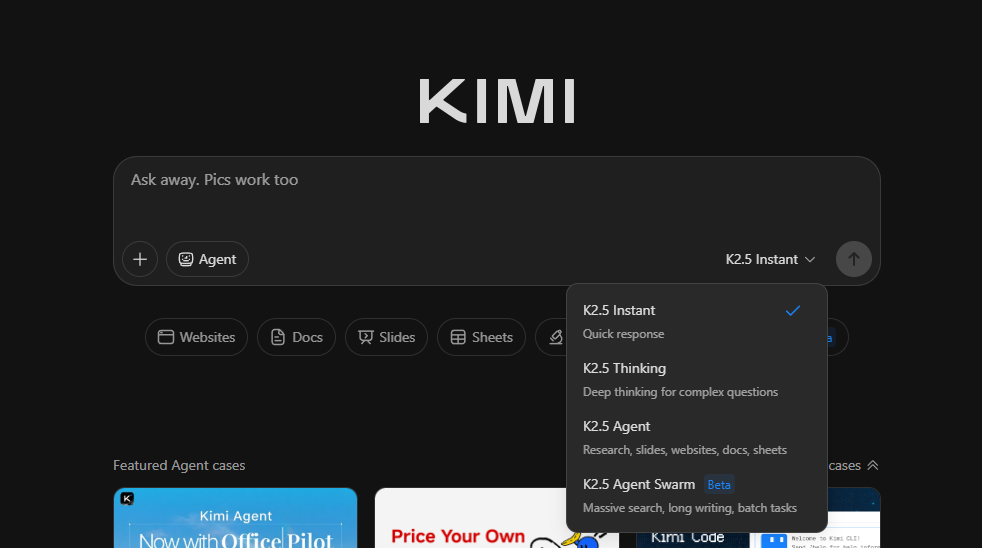
Kimi K2.5 models offer four different sub-models depending on the needs of the users and the complexity of the given task. Each model has a different number of parameters, performance, and token usage.
- K2.5 Instant: For Quick Response and Tasks
- K2.5 Thinking: For Complex and Multi-Step Tasks
- K2.5 Agent: For tasks requiring research, websites, documents, and slide sheets
- K2.5 Agent Swarm: For tasks such as massive search, batch tasks, and long writing/coding
Kimi K2.5 Pricing
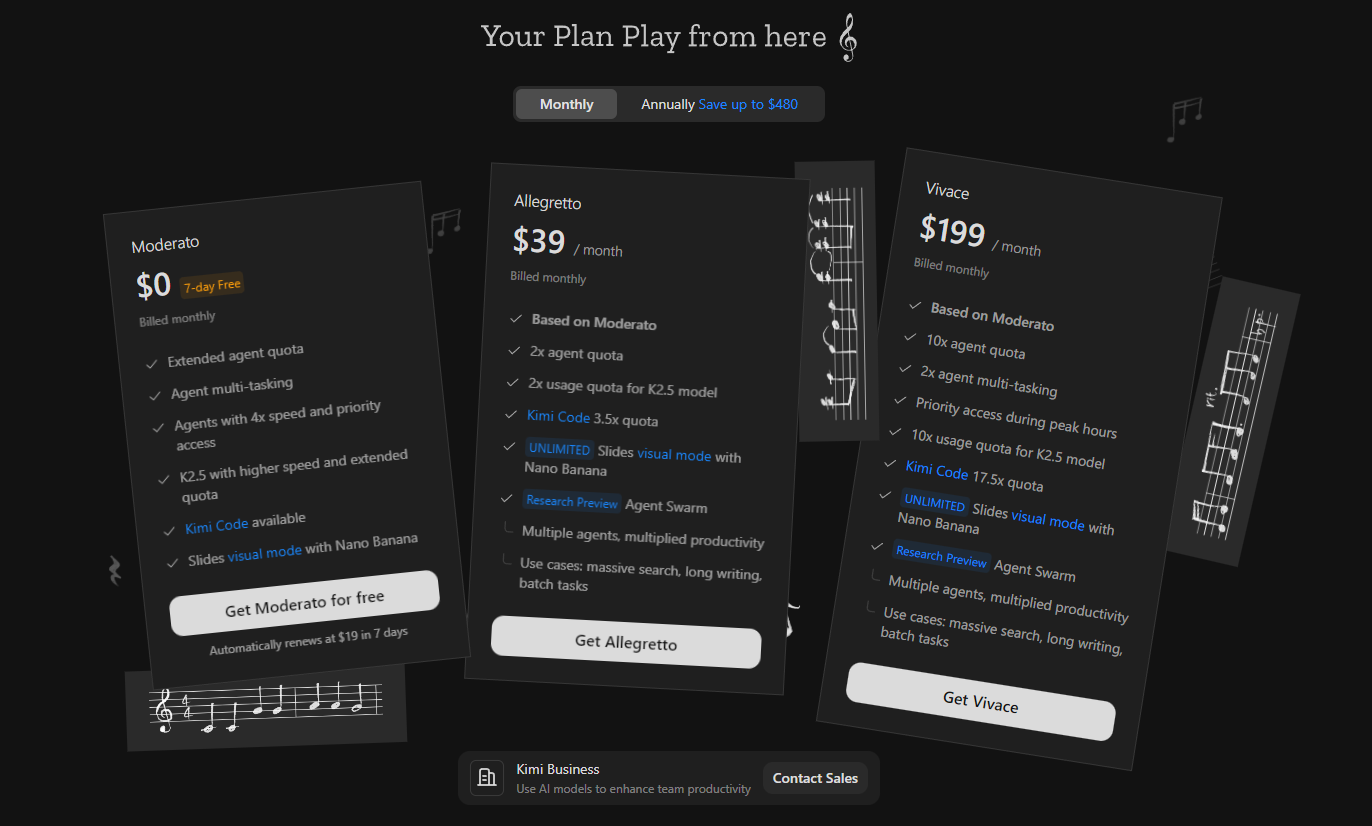
While Kimi K2.5 users can enjoy a free experience, to use it with unlimited and full performance you need to subscribe to one of three pricing plans:
- Moderato: $19 per month after a 7-day free trial
- Allegretto: $39 / month
- Vivace: $199 / month
How to Access Kimi K2.5?
There are five different ways to access the Kimi K2.5 model. The first is to use it through Kimi AI's web application. Secondly, you can access the K2.5 model as an API. Additionally, the Kimi K2.5 model is integrated with open-source platforms like HuggingFace. You can also access the Kimi K2.5 model through Kimi Code.
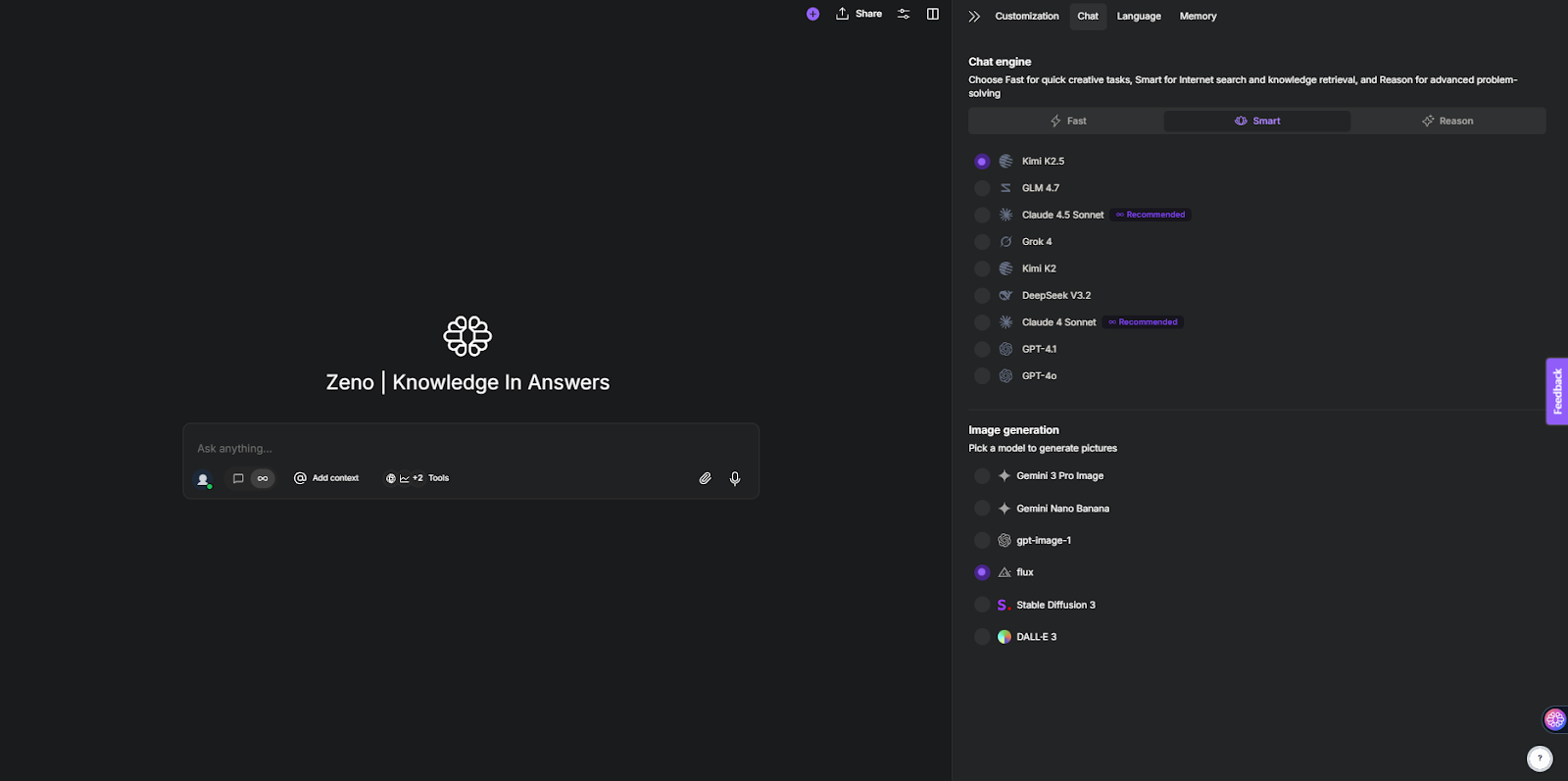
Finally, to integrate the Kimi K2.5 model into your enterprise workflow, you can access it via TextCortex.
Kimi K2.5 Features
The Kimi K2.5 model has managed to outperform its predecessor, the Kimi 2K, and incorporates new features. Let's take a closer look at the features of the Kimi K2.5.
Kimi K2.5 Agent Swarm
Kimi K2.5's most prominent feature is its Agent Swarm. Instead of using and managing pre-built agents, this feature allows Kimi K2.5 to spawn the necessary agents for each task and project, select which tools to use, and determine how to measure results. Kimi K2.5 can autonomously create and coordinate an agent swarm of up to 100 sub-agents to execute the specified tasks. Agent swarm offers:
- Research Synthesis
- Multi-step Verification
- Iteral Refinement
- Parallel Task Execution
Kimi K2.5 Performance
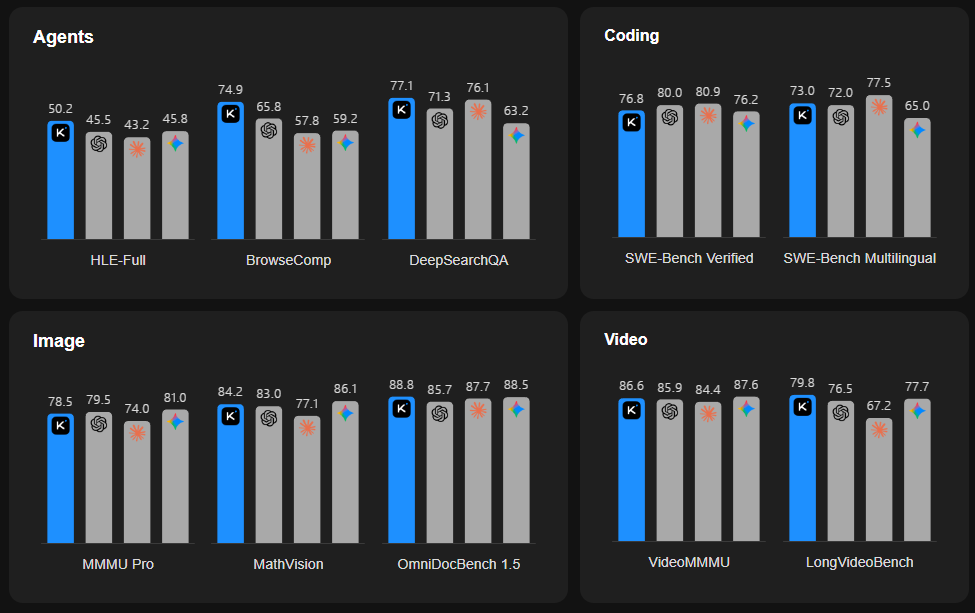
Although Kimi K2.5 doesn't offer the best coding, writing, reasoning, image, or video performance, it does deliver top-tier agentic performance. Kimi K2.5's strength lies not in its generation capabilities, but in its ability to manage and create different agents. While it may lag slightly behind competitors in benchmarks like coding, it outperforms them in agentic benchmarks.
Native Multimodal Architecture
The Kimi K2.5 model naturally processes image, video, and text input types. The Kimi K2.5 model supports GIF, JPEG, PNG, and WebP image formats, as well as MP4, MOV, AVI, FLV, MPG, WebM, WMV, and 3GPP video formats. This allows the model to deliver top-tier performance in image and video understanding.
Production-Ready Coding
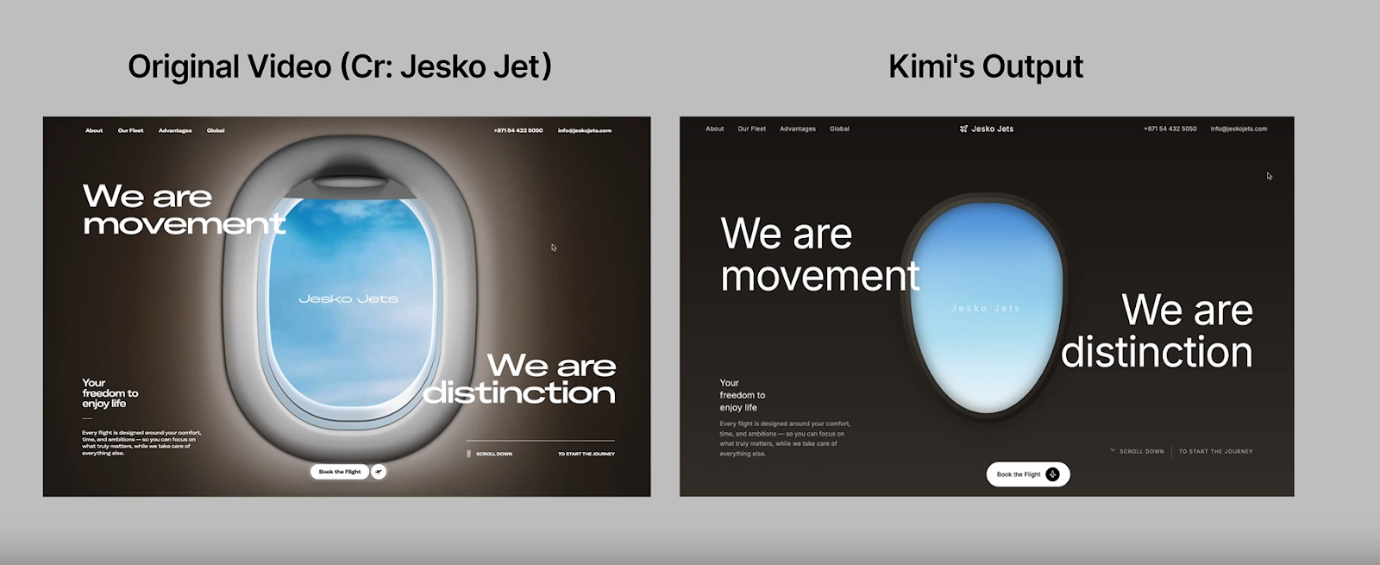
Although Kimi K2.5 models have lower coding benchmark scores than GPT-5.2 and Claude Opus 4.5, they can still generate production-ready code outputs for users. Code generated with Kimi K2.5 models can include elements such as scroll animation, dynamic layouts, database schemas, and frontend implementations.
Context Window
Although it can't outperform the Claude models' context window sizes of up to 1 million, the Kimi K2.5 model offers users a context window with 256K tokens. This context window is approximately equivalent to 190,000 words and 384 pages of text. Therefore, when working with the Kimi K2.5 model, you don't need to worry about whether you have enough space to input your documents.
TextCortex : Integrate Kimi K2.5 into Your Workflow
If you're looking for an AI automation solution that can integrate a wide range of large language models, including Kimi K2.5, into your enterprise workflow, then TextCortex is for you. TextCortex is a leading knowledge management and workflow automation tool that aims to lighten users' workloads and enable them to quickly access the information and data they need.
Kimi K2.5-Powered AI Agents
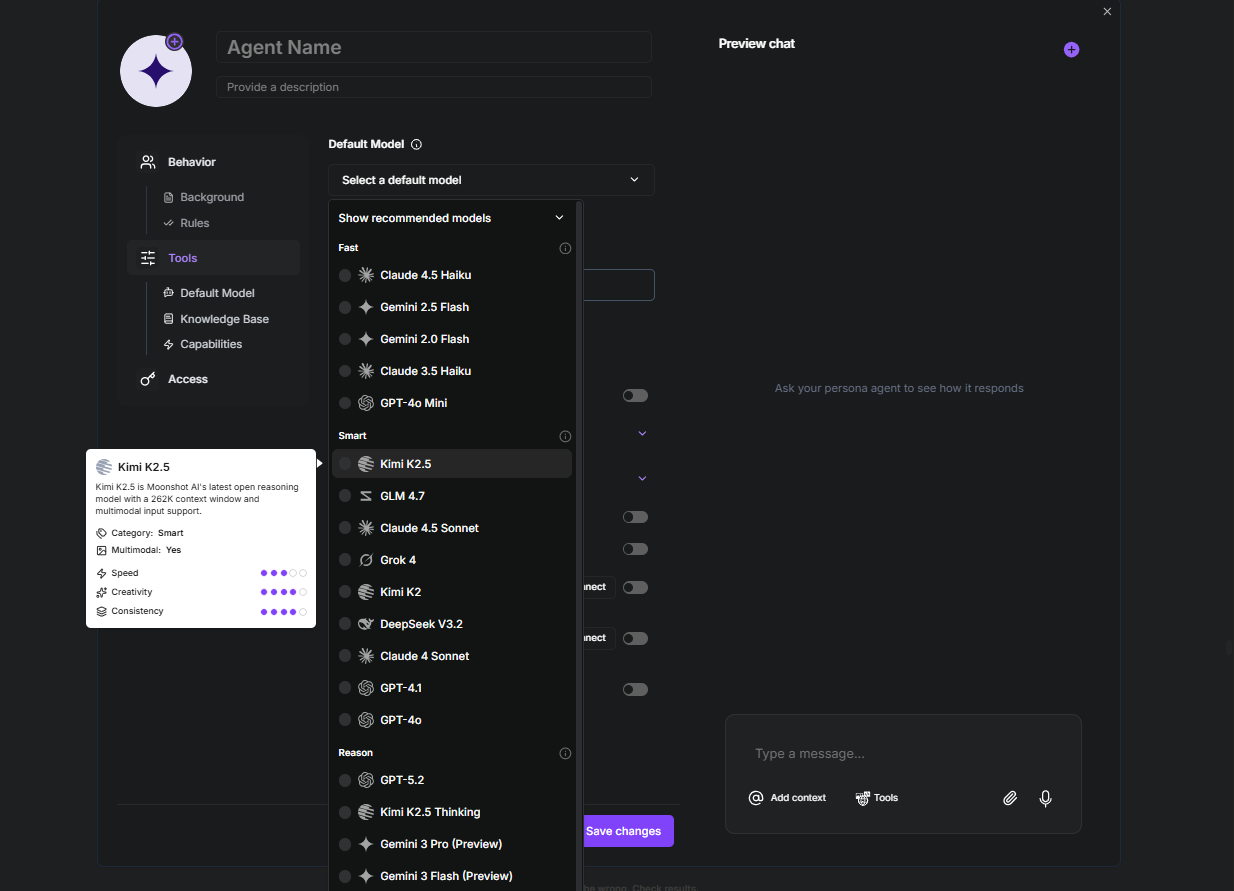
If you want to integrate the Kimi K2.5 model into your workflow, our AI agent builder is your solution. With our AI agent builder, you can build AI agents that use a wide range of large language models, including the Kimi K2.5 model, as the default model. Once you've created your Kimi K2.5-powered AI agent, you can use it to automate specific tasks. To build an AI agent that uses the Kimi K2.5 model as the default model with TextCortex AI agent builder, simply:
- Log in to your TextCortex account
- Tap the "+" symbol under the Agent tab
- Click the "Tools" section on the AI agent builder screen
- Select Kimi K2.5 as the default model
Frequently Asked Questions
Is Kimi K2.5 free?
Kimi offers free access to the Kimi K2.5 model through Kimi.com. However, the free version of Kimi K2.5 has limited usage and features.
How does Kimi AI work?
Kimi AI models function as generative AI models, analyzing given inputs and generating related outputs. Kimi AI models are particularly functional in tasks like coding and debugging, as they explain the logic of code and suggest optimization.
How to use Kimi K2.5?
To use Kimi K2.5, you can head to its official website or use it as an API. If you want to integrate Kimi K2.5 into your enterprise workflow, you can use TextCortex.
.png)
.png)
.png)