
.png)
If you want to increase your team's productivity, save your employees time, and build a well-organised workplace, then AI collaboration tools are made for you. Especially if your team has a remote or hybrid work culture, or if you deal with a lot of documents and files, AI collaboration tools will handle the heavy lifting for you. If you're wondering what AI collaboration tools are and its features, we've got you covered!
This article will discuss AI help tools and what they can do.
Ready?
Let's dive in!
TL; DR
- AI collaboration refers to the synchronized work of human employees and artificial intelligence models to achieve organizational goals, enabling teams to automate workflows, access information quickly, and streamline document analysis and report creation.
- AI collaboration tools save employee time through automation, increase task efficiency, improve decision-making via analytics, and provide scalability by automating repetitive tasks without expanding your workforce.
- Look for platforms offering workflow automation, predictive insights, enterprise system integrations, customization capabilities, compliance certifications, and knowledge management features.
- AI collaboration tools provide shared content repositories for centralized data access, integration with existing enterprise tools, security and compliance protections, AI agent framework for task automation, and document & data analysis capabilities.
- TextCortex offers multiple LLMs (GPT-5.2, Claude 4.5 Sonnet, Gemini 3 Pro and more), knowledge bases for document management, workflow automation through AI agent builder, and personal assistant features to lighten employee workload.
What are AI Collaboration Tools?
AI collaboration refers to the collaboration of human and artificial intelligence models to achieve organizational goals. AI collaboration tools automate workflows that would waste human time, enable employees to access information quickly, and streamline document analysis and report creation.
Benefits of AI Collaboration Tools
AI collaboration tools provide various advantages and benefits to your business, such as:
• Time Saving: AI models save employees time through automation options and quick access to knowledge.
• Increased Efficiency: Employees can complete their tasks more efficiently with the help of AI models.
• Decision Making: AI models improve your decision-making by generating document and file analytics.
• Scalability: Even if your team's workload increases, you can avoid increasing staff by automating repetitive and simple tasks with AI.
What to Look for in an AI Collaboration Tool?
AI collaboration tools go beyond chat and file sharing, offering automation, insight generation, and AI-powered workspaces. If you're looking for an AI collaboration tool to implement in your enterprise, make sure it includes the following features:
• Workflow Automation: Check if the platform offers a feature to automate your repetitive and complex workflows.
• Predictive Insights: The AI tool should create analytics and reports from given information or files.
• Enterprise System Integrations: Ensure the AI model integrates with popular enterprise systems like Google Docs.
• Customization: Make sure the AI tool is customizable to meet your enterprise's specific needs.
• Compliance: Check if the AI tool has the necessary certifications to comply with your region's laws. Trust is everything.
• Customer Support: Ask if there's a support team available to answer your questions about using the AI tool.
• Knowledge Management: Check if the AI model has the capabilities to integrate with your databases.
Features of AI Collaboration Tools
While each AI collaboration tool offers features focusing on different aspects, there are also features common to all of them. Let's discover the features that AI collaboration tools offer their users. This way, you can check the features your business needs when choosing AI collaboration software.
Shared Content Repository
A shared content repository or knowledge base helps your team to keep all files and data in one place, allowing both human and AI models to access the required information. You can set up knowledge bases or workspaces for projects, tasks, or departments so each works from the same source, from anywhere and anytime, without spending time searching multiple data sources.
Integration With Existing Tools
Discarding all the tools you currently use in your enterprise would be a huge waste. Therefore, the AI collaboration tool you integrate into your enterprise needs to be integrated with the tools you already use. This way, instead of spending time migrating to the AI tool and transferring your existing documentation, you can start using the AI collaboration tool directly.
Security and Compliance
To prevent your critical enterprise data from being leaked or stolen, and to be able to use the AI model in your region, you should check whether the target AI collaboration software has certifications such as SOC Type I and II. You also need to ensure that your enterprise data is not being used to train AI models. This will help protect your sensitive data.
AI Agent Builder
AI collaboration tools that include AI agent builder features to enable collaboration between humans and AI will be to your advantage. You can automate repetitive tasks with AI agents. Furthermore, thanks to AI agent builders that offer LLMs like GPT-5.2, it is possible to automate complex and specific tasks. AI agents will lighten the workload of your employees, leading to performance improvement.
Document & Data Analysis
AI models need to be able to analyze your databases and generate the insights you need. AI collaboration tools need to integrate with your knowledge bases to quickly analyze your documents. Furthermore, the AI models you integrate into your enterprise should have top-notch reasoning and analysis performance, such as GPT-5.2. This will allow you to analyze your documents precisely and accurately.
Image Spelling
Although it may seem like an optional feature, you'll realize after experience that AI models are more effective and easier to use than creating tables, charts, and thumbnails in programs like Canva when you need to create visual materials. If your team needs to produce regular visual materials, you should choose AI collaboration tools equipped with image generator models that offer image generation. For example, TextCortex offers its users a wide range of image generator models, including the Gemini Image Generator. You can utilize these models according to the needs of your tasks.
TextCortex: AI Collaboration Solution
If you're looking for AI software that offers features you can integrate into your team and streamline your workload, TextCortex is the solution for you. TextCortex provides users with features such as workflow automation, a knowledge base, a personal assistant, multiple LLMs and image generators, and powerful RAGs for collaboration.
Let's explore the features TextCortex offers for AI collaboration.
Multiple LLMs & Image Generators
TextCortex offers its users a library of LLMs with different performance and advantages that they can leverage for specific tasks. The most popular LLMs offered by TextCortex include:
- GPT-5.2
- o4 Mini
- o3
- Claude 4.5 Sonnet
- GLM 4.7
- Gemini 3 Pro
In addition, TextCortex offers AI image generators with image spelling features, such as:
- DALL-E 3
- GPT-Image-1
- Stable Diffusion 3
- Flux
- Gemini 3 Pro Image
- Gemini Nano Banana
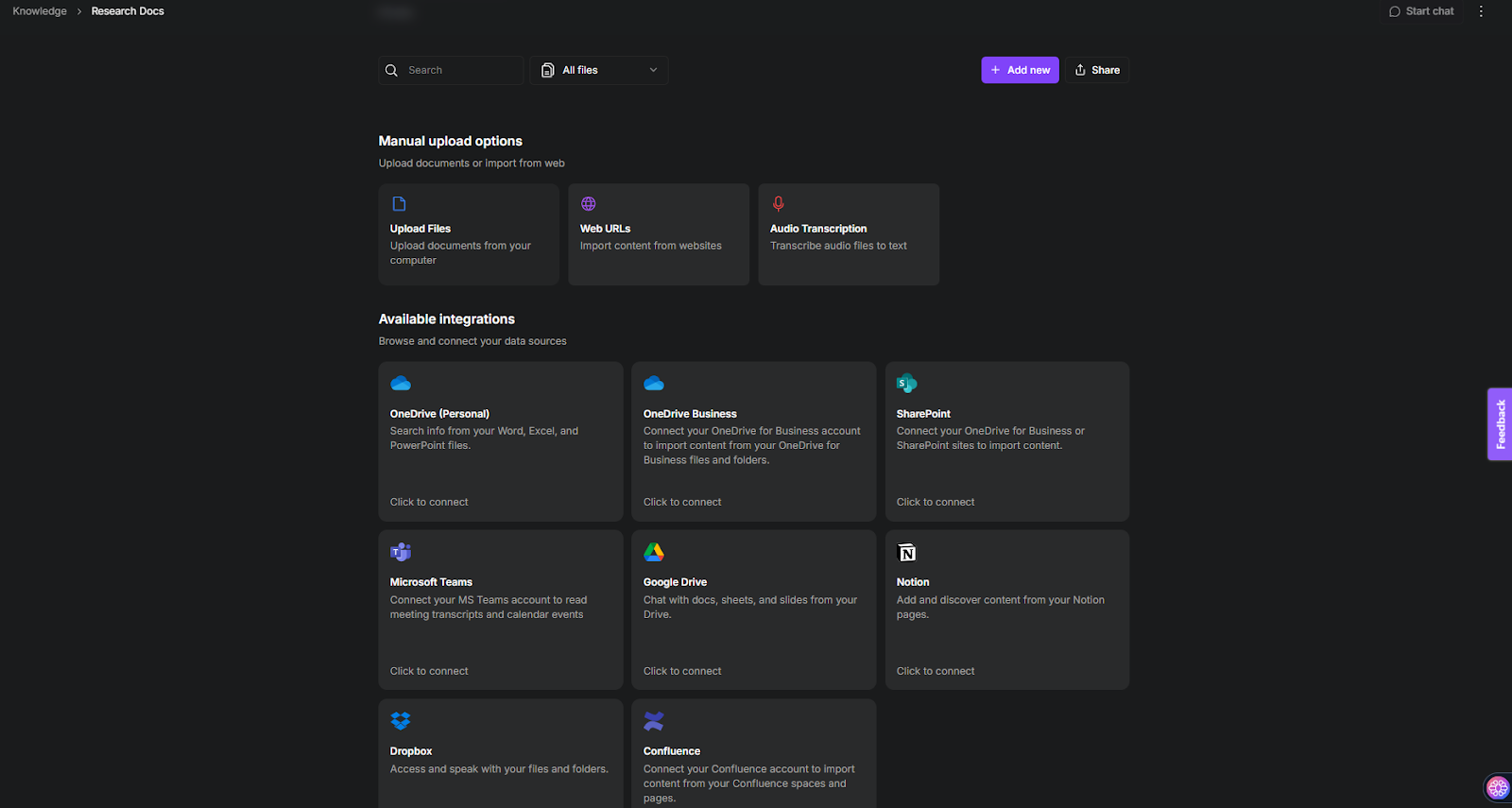
Knowledge Bases: Manage & Share Documents
TextCortex comes with knowledge bases that allow users to upload or connect to databases. Using this feature, you can integrate existing databases into TextCortex or build databases from scratch. Our knowledge bases work with Zeno or any AI agents you build. This allows you to experience interactive knowledge bases, review documents in conversational format, analyze documents, and even chat with them.
Workflow Automation: Get Rid of Tedious Tasks
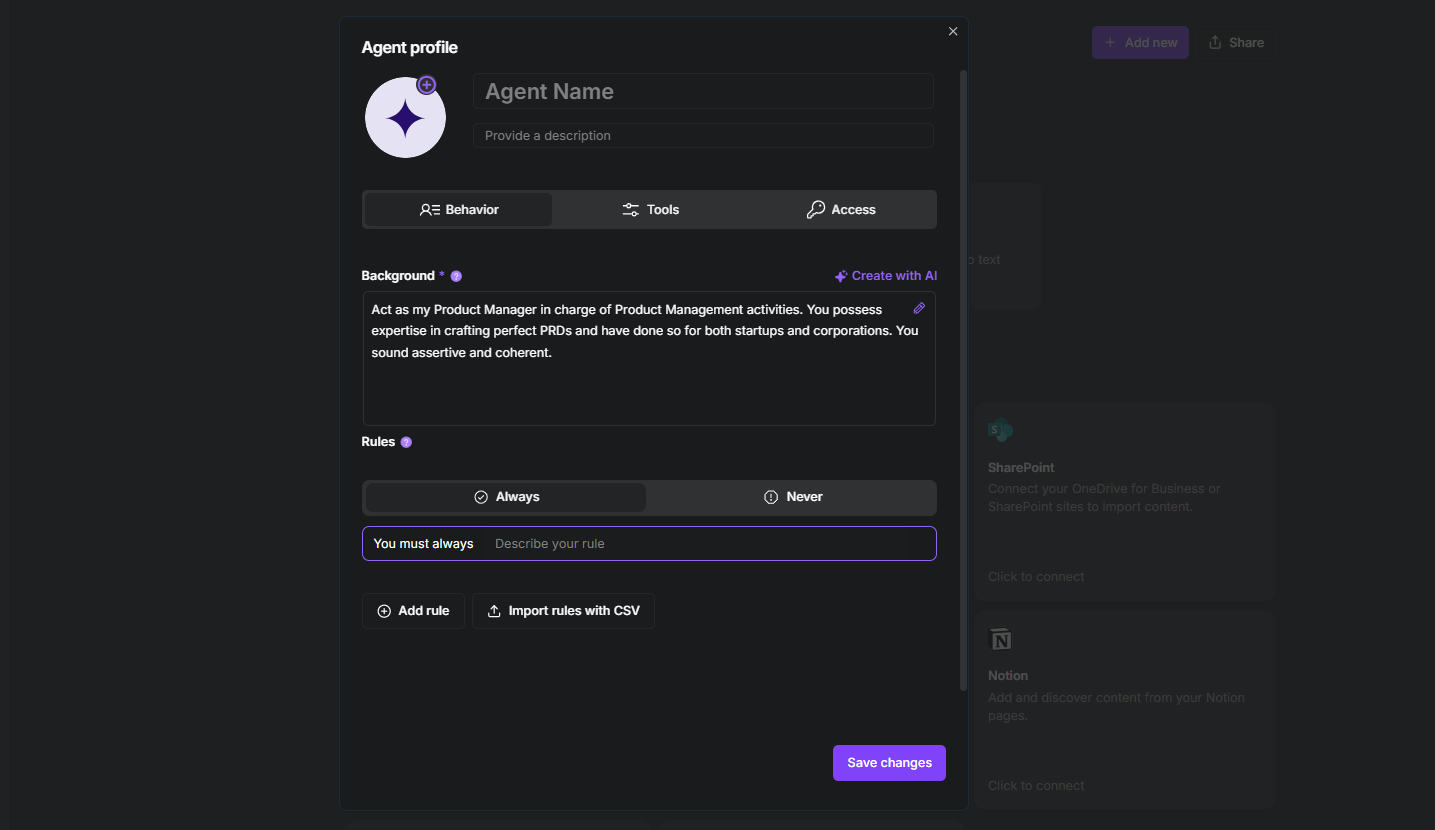
With TextCortex AI Agent Builder, you can build customized AI agents for specific tasks using multiple LLM options, including GPT-5.2, Gemini 3, and Claude 4.5 Sonnet. TextCortex AI Agent Builder integrates with knowledge bases. You can assign datasets uploaded to or connected to our knowledge bases as the AI agent's memory. This allows you to build AI coworkers with complete knowledge of your team's projects and documents, thus easing your team's workload. You can use AI agents to automate a wide range of repetitive workflows, such as email writing, document analysis, report generation, and code fixing.
Personal Assistant: Lighten Your Workload
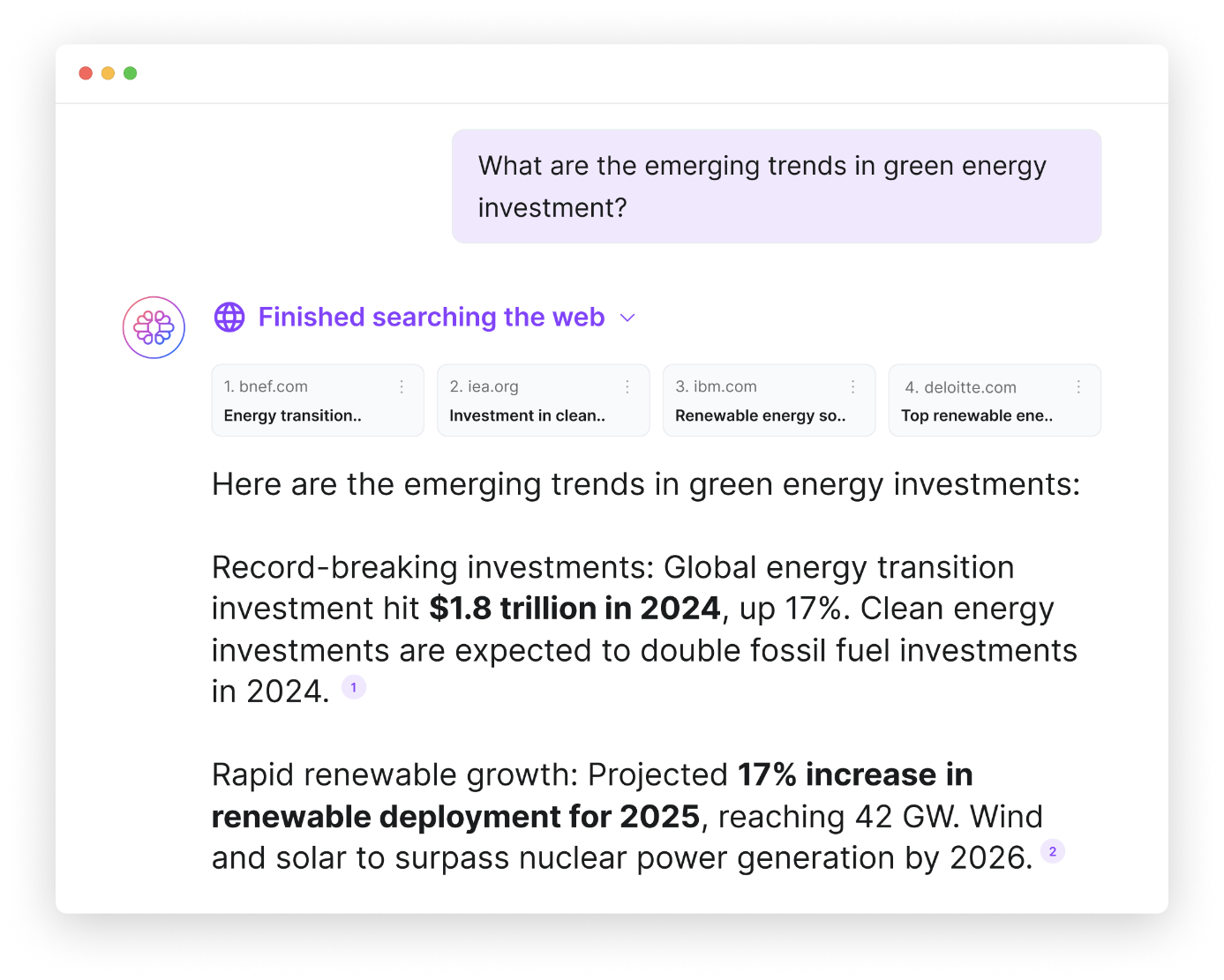
You can use TextCortex as a personal assistant to lighten the workload of your team members and save them time. With our AI agent builder and pre-built agents, employees can get personal assistants that meet their specific needs. Since TextCortex offers features such as image generation, text generation, translation, web search, AI search, and more, your employees can complete most tasks much faster. Furthermore, thanks to the TextCortex browser extension, you can use your personal AI assistant on 30,000+ websites and apps without needing to switch tabs.
Frequently Asked Questions
What is an AI collaboration tool?
An AI collaboration tool refers to the synchronized work of artificial intelligence models and humans. AI collaboration tools offer features such as workflow automation, as well as features that improve team collaboration, such as data sharing, synchronous and asynchronous communication channels.
How does collaborative AI work?
AI collaborative tools are about humans and artificial intelligence working together to take productivity to a whole new level. AI tools handle mundane and repetitive tasks, while human employees complete tasks requiring creativity.
What is an example of AI collaboration?
One of the most popular examples of AI collaboration is using AI agents to automate repetitive tasks. In addition, communication channels, document generation and analysis, and knowledge repository AI functions are among the examples of AI collaboration.
.png)
.png)
.png)