
.png)
Claude AI has been a prominent AI platform since its inception, distinguished by its Large Context Window and its own large language models. Compared to its competitors, OpenAI and other large language models, Claude AI consistently offers high performance and maintains high standards. One of Claude's newest additions is the Claude application, which you can use both on the web and download to your desktop. Furthermore, Claude AI was the first platform to introduce AI agent capabilities called "Skills." If you want to know the best Claude AI skills, we've got to cover.
In this article, we will take a look at the Claude best Claude AI skills.
TL; DR
- Claude AI is an AI platform with its own LLMs, known for strong performance and a large context window, available as both a web app and a desktop app.
- Claude “Skills” are reusable prompt bundles (often packaged as a SKILL.md) that let you execute multi-step workflows with a single command instead of prompting step-by-step.
- You can use skills by loading or creating one, enabling it in the right project/workspace, attaching any needed files/sources, giving clear inputs + output format, and running the request.
- TextCortex is a cloud-based alternative for enterprise automation and knowledge management that allows you to create and use skills with AI agents.
What is Claude AI?
Claude AI is an AI platform that develops its own large language models and provides them to users as both a desktop and a web application. The platform's priority is to offer users large language models and other plugins that can be used with them. One of these plugins is "skills," a feature that enables AI agents to work more effectively and allows AI models to handle complex tasks more efficiently and easily.
What are Claude AI skills?
Claude AI skills are groups of prompts that allow you to process multiple prompts on a single line, eliminating the need to enter prompts individually for each action. With Claude AI skills, you can solve and complete tasks involving multiple steps and actions using just one skill. You can use existing skills or create your own from scratch with Claude AI. Moreover, creating skills with Claude AI is as easy as chatting; all you have to do is chat with the Claude AI skill generator.
How to use Claude AI skills?
To use Claude AI skills, all you need to do is load a skill onto Claude AI or create a skill with Claude AI. After that:
- Open Claude in the web app or via app, sign in, and start a new chat or choose the right project/workspace for your task.
- Enable the specific skill/tool you need and connect any required sources like documents or cloud storage.
- Provide the necessary inputs and clear instructions, including context, files, and the exact output format you want.
- Run the request
And that's really all. Now you can create or upload any cloud skill into Claude AI and start using them.
The Best Claude AI skills
Claude AI skills are features that add different characteristics and capabilities to your AI agents, making them better than they already are. If you're wondering about the best Claude AI skills, we've got to cover. Also, some of these skills are official Anthropic, so they don't carry any virus risk.
1. PDF Skill (Anthropic official)
If you’re working with contracts, reports, policies, or any long document, the PDF skill is one of the most valuable Claude skills you can install. It helps Claude extract key clauses, highlight risky sections, and summarize long files into actionable takeaways so you don’t lose hours scrolling and re-reading. In other words, it turns PDFs from a productivity trap into a workflow you can complete in minutes.
2. DOCX Skill (Anthropic official)
The DOCX skill is designed for teams who write and edit documents every day and want Claude outputs that actually feel ready to use. Instead of generating text that you still need to copy, format, and restructure manually, this skill helps you produce consistent Word documents for proposals, SOPs, internal documentation, and client deliverables. If documentation is a core part of your work culture, DOCX is the skill that makes Claude fit in immediately.
3. PPTX Skill (Anthropic official)
The PPTX skill is the shortcut between raw ideas and real slides. Whether you’re preparing a sales deck, building onboarding material, or turning a strategy document into an executive presentation, this skill helps Claude generate and structure PowerPoint files faster and with less friction. If your team relies on presentations to align stakeholders, the PPTX skill is a direct time-saver.
4. XLSX Skill (Anthropic official)
Spreadsheets are still the backbone of operations, finance, planning, and reporting and the XLSX skill makes Claude much more useful inside those workflows. You can create and parse Excel files, generate tables, build trackers, and turn messy data into structured spreadsheets without doing everything manually. If you want to speed up repetitive spreadsheet work and keep your team organized, XLSX is a must-have.
5. Frontend Design Skill (Anthropic official)
Most AI-generated UI looks generic, and that’s exactly why the Frontend Design skill matters. It helps Claude generate cleaner, more structured, and more production-ready interfaces by pushing it beyond“template-looking layouts. If you’re building prototypes, internal tools, or MVPs and want to reduce the AI slop effect, this skill raises your UI baseline and improves the quality of what you ship.
6. Skill Creator (Anthropic official)
The Skill Creator is the skill that upgrades everything else—because it helps you create new skills based on your own workflows. Instead of rewriting the same playbooks, formatting rules, and step-by-step processes in every new chat, you turn them into a reusable SKILL.md file once. The result is simple: Claude starts working in your style, with your standards, and your workflow logic without you repeating yourself.
7. Firecrawl Skill + CLI
If you want Claude to pull reliable web data, the Firecrawl skill is one of the strongest capability uplift options available. It adds structured web scraping, search, and browser automation especially useful for modern, JavaScript-heavy websites where basic scraping usually fails. If your workflows include research, competitive analysis, or content collection, Firecrawl can turn Claude into a much more consistent web agent.
8. Vercel Web Design Guidelines
The Vercel Web Design Guidelines skill is built for teams that want better UI quality without relying on guesswork. It audits UI code against a wide set of UX and accessibility rules, helping you catch common issues early and keep standards consistent as you ship. If you’re building user-facing products and want fewer “we’ll fix it later” design problems, this skill acts like a quality control layer.
9. Webapp Testing (Playwright)
Manual testing is repetitive, slow, and easy to skip under pressure which is why the Webapp Testing skill is so valuable. It helps Claude test your local app in a real browser using Playwright, allowing you to validate user flows, detect regressions, and reduce release risk. If you want faster feedback loops and more stable launches, this skill is a practical addition to your development workflow.
10. Trail of Bits Security (CodeQL + Semgrep)
If you care about shipping fast without shipping vulnerabilities, the Trail of Bits Security skill is a strong choice. It helps Claude run CodeQL and Semgrep-style analysis to surface risky patterns and potential security issues earlier in the cycle. For teams that want security to be part of the workflow rather than a last-minute checklist this skill makes the process more systematic.
11. Superpowers
The Superpowers skill is for people who want Claude to slow down and think before jumping into execution. It introduces structured planning, requirement clarification, discovery, and often TDD-style workflows, so the output becomes more reliable and less “first draft.” If you’re working on complex projects and want fewer rewrites and less back-and-forth, Superpowers is the skill that changes Claude from a fast responder into a more deliberate operator.
TextCortex AI: Cloud-based Enterprise Infrastructure
If you're looking for an AI platform to automate all your enterprise-level workflows and improve your knowledge management, TextCortex is the perfect choice. TextCortex is the leading platform that aims to reduce the workload for enterprises by providing knowledge management features and a secure AI agent framework.
TextCortex Features
TextCortex provides knowledge bases that allow users to upload internal data or connect to databases. With knowledge bases, you can create folders for different data groups. Another TextCortex feature is the AI agent framework, which integrates with knowledge bases. With the TextCortex AI agent builder, you can build AI agents to perform and automate specific tasks, and add your knowledge base data. You can build your AI agents manually with TextCortex or use our AI agent builder feature. Furthermore, TextCortex's wide range of LLM support allows you to choose the optimal large language model for each task.
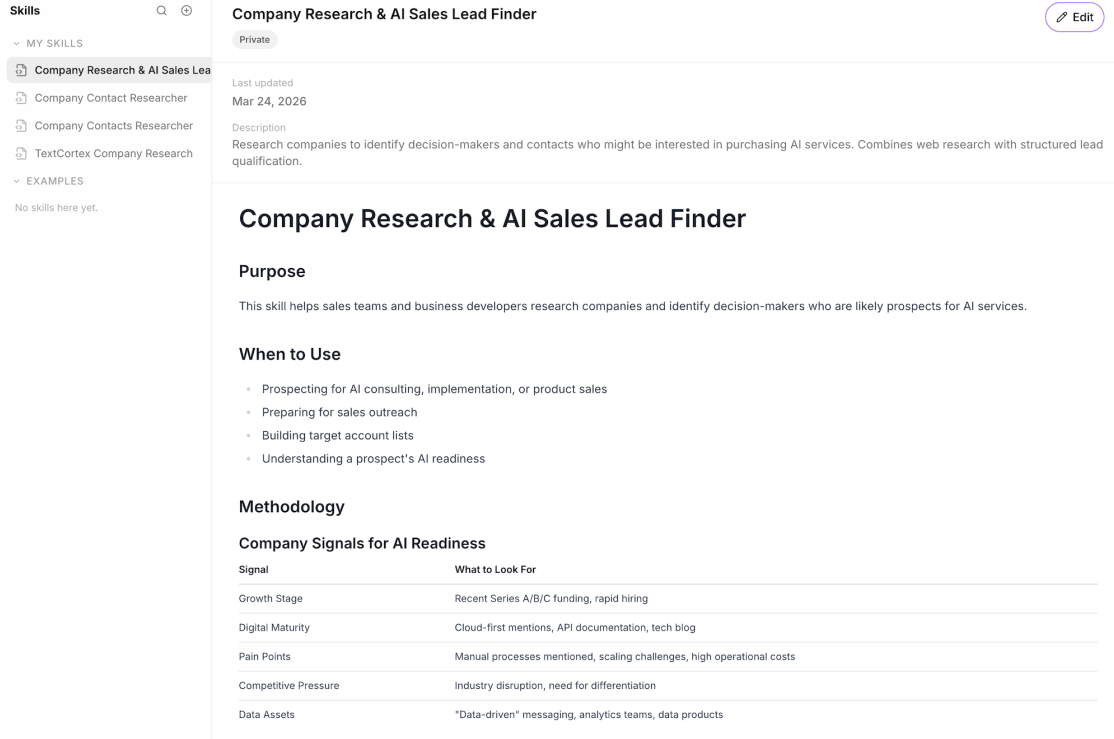
You can leverage our connectors and skills features to use your AI agents more effectively. With the skills feature, you can create prompt groups for specific actions and tasks and use them modularly in any of your AI agents.
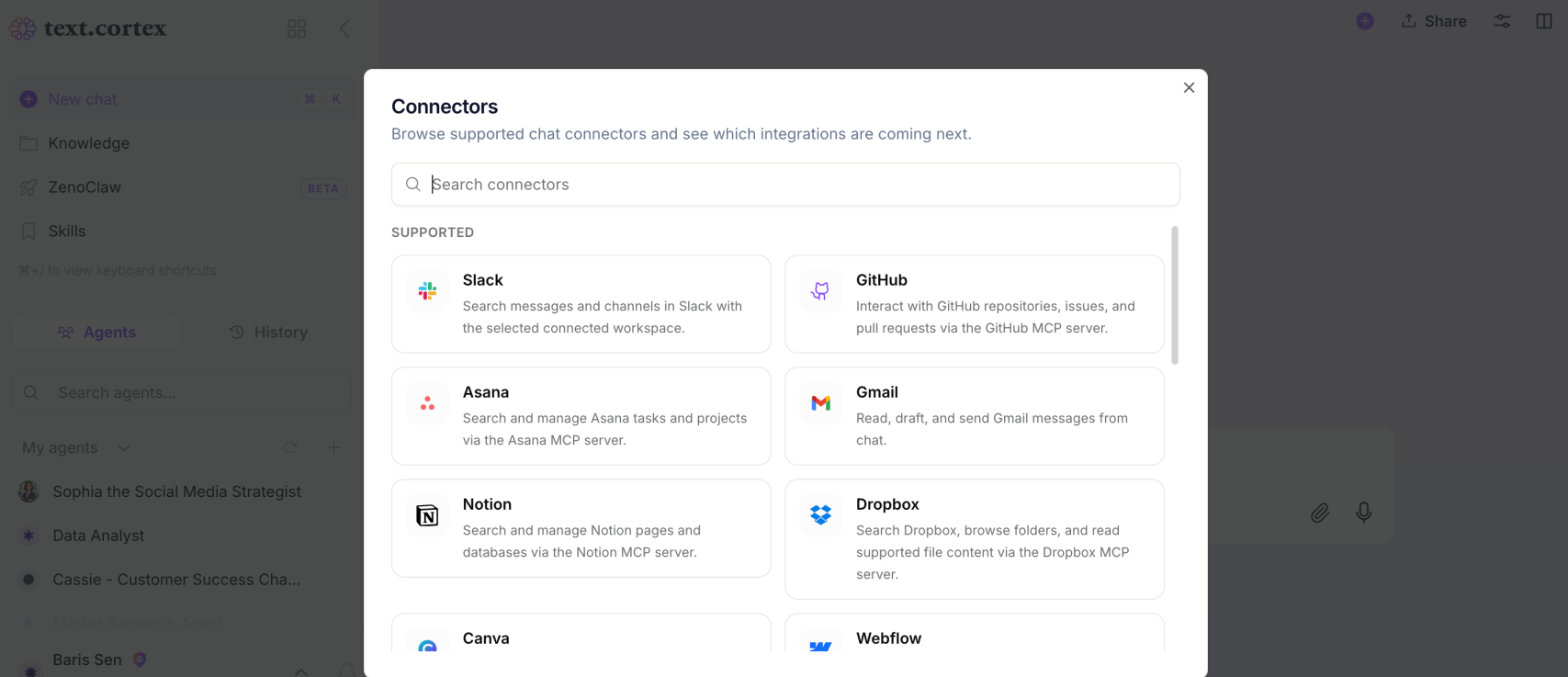
Our connectors feature allows you to integrate third-party apps into your skills or agents. For example, if you want a skill you've created to be activated in Slack, you can integrate Slack with a specific skill using connectors.
Frequently Asked Questions
What are Claude AI skills?
Claude Code skills are folders that contain a SKILL.md file (and optionally supporting scripts/resources). SKILL.md includes YAML frontmatter (like name and description) plus markdown instructions Claude follows when the skill runs.
How do Claude skills get triggered and used?
Skills can trigger automatically when your request matches the skill description, so Claude loads the instructions only when they’re relevant. You can also run a skill directly by typing /skill-name.
Do skills always consume context, or only when needed?
Skills are designed to keep context clean, Claude reads the name and description up front, but loads the full instructions only when a skill matches your task. This makes it easier to keep many skills installed without bloating every session.
.png)
.png)
.png)