
.png)
AI models are functional in the browser, but imagine if they were specifically designed for your operating system and helped you with everything from folder organization to organizing your email inbox. That's where OpenClaw comes in. Instead of just offering conversational AI chatbots or enterprise task automation, OpenClaw provides functional features suitable for everyday use. If you're wondering what OpenClaw is, we've got you covered! In this article, we'll explore OpenClaw and its features.
Ready?
Let's dive in!
TL; DR
- OpenClaw is an open-source AI agent that can run on your machine and integrate with applications you already use.
- OpenClaw offers users integration with over 50 apps and AI models.
- OpenClaw can run on users' PCs, be upgraded with extra skills and plugins, and access the system to use the computer.
- OpenClaw can generate output using high-end and popular large-language models.
- If you want to build AI agents to automate your specific workflows in a cloud environment, TextCortex is the way to go.
What is OpenClaw?
OpenClaw is an open agent platform that runs on your machine and works from the apps you already use, such as WhatsApp, Discord, Gmail, Hotmail, Slack, Telegram, and more. What distinguishes OpenClaw from other AI agent platforms is that it runs on your local machine. This means your data is processed on your local device instead of being uploaded to online servers. In short, while you need to go to other AI agent platforms to use them (despite their extensive integrations), OpenClaw comes to your workspace.

Although OpenClaw runs on your local device, it requires a constant internet connection and your device being turned on to continue functioning.
How Does OpenClaw Work?
To run OpenClaw, you first need to install it on your local device. After that, you can integrate OpenClaw into the applications you already use. OpenClaw aims to complete given tasks by reading users' files and data.
OpenClaw Security Concerns
OpenClaw's constant internet connection, linked to your personal accounts, causes many users to worry about data privacy and security. While OpenClaw promises high security, anything can go wrong at any moment. If you want to use OpenClaw more securely, we recommend installing it on an isolated device or using a VPS (Virtual Private Server).
OpenClaw Integrations
OpenClaw owes its functionality as an AI agent to its integrations as much as to the features it offers. OpenClaw integrates with most applications that people use in their daily or professional lives. OpenClaw offers integrations with more than 50 applications, some of the most popular include:
- Telegram
- Discord
- Slack
- iMessage
- Signal
- Microsoft Teams
- Spotify
- Gmail
- Twitter/X
OpenClaw Features
OpenClaw offers its users various integrations and a native AI agent experience. Let's take a closer look at OpenClaw's features.
Runs on Your Machine
Instead of running OpenClaw on a server to generate output, it runs on your local system or wherever you prefer. This allows you to use your data or complete tasks requiring computer use without uploading it to online servers.
Communication App Integrations
OpenClaw isn't just about using its own interface. It can integrate with popular applications like Discord and Telegram, accompanying you wherever you chat. If you want to use an AI model on familiar communication platforms, OpenClaw is designed for you.
Skills and Plugins
Do you remember ChatGPT's early days of popularity and its plugin support? Similarly, OpenClaw allows users to add and develop plugins and customize OpenClaw's skill library. If you find OpenClaw's features insufficient but still use it actively, you can check out its communication skills and plugins, or add your own plugin to OpenClaw.
System Access and Computer Use
OpenClaw offers users the ability to read and write their local files. For example, if your desktop is cluttered and you don't want to bother organizing it, OpenClaw analyzes all related files and documents and moves each one to a different folder. It helps you get rid of the clutter on your desktop.
Persistent Memory
While single-shot AI agent communications handle your work instantly, OpenClaw provides memory for long-term conversations and tasks. This allows you to perform long-term tasks with OpenClaw and resume ongoing tasks from where you left off. OpenClaw processes users' previous actions and conversations when generating output.
LLM Integrations
OpenClaw offers users the ability to work with the most advanced large language models. OpenClaw is not an LLM, but a tool that allows you to work with different AI models and utilize their power on your local system. With OpenClaw, you can choose one or more popular and state-of-the-art AI models and use them in tasks requiring personal and computer use. OpenClaw's LLM integrations include:
- Claude Models such as Opus 4.5
- OpenAI Models such as GPT-5
- Google Models such as Gemini 2.5 Pro
- XAI Models such as Grok 4
- DeepSeek Models
- ChatGLM Models
Web Search
OpenClaw can interact with your browsers in addition to your local files, performing web searches and filling out forms for you. Instead of just web searches, OpenClaw uses your local web browsers to perform organic searches and find the information you need. Furthermore, OpenClaw can analyze any website or webpage and extract data.
TextCortex – Your Company AI Agent
If you're looking for a company AI agent that integrates with your cloud-based company applications and allows you to build AI agents for specific tasks, offering multiple LLM support, TextCortex is the solution for you. TextCortex is a leading knowledge management and workflow automation platform that aims to reduce time spent traversing databases searching for information and repetitive, mundane tasks.
Manage Your Knowledge with AI
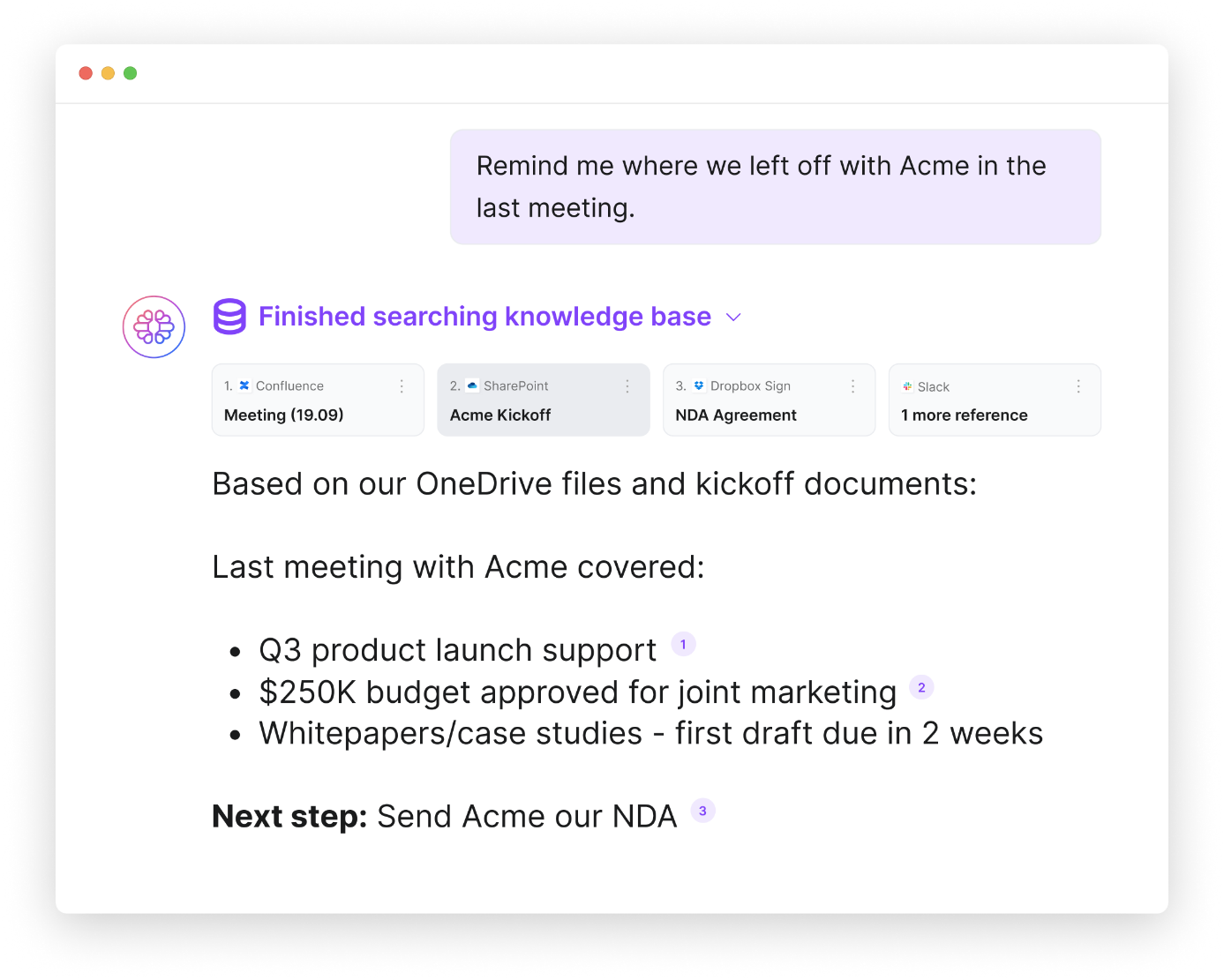
TextCortex comes with knowledge bases that allow users to connect their databases with a single click or manually upload their data. With our knowledge bases, you can create separate folders for your projects, departments, tasks, and individuals. Once you connect your external databases to TextCortex, you can quickly find the information you need, analyze your documents, or generate insights using Zeno or the AI agents you've built.
Build Custom AI Agents
With TextCortex AI agent builder, you can build custom AI agents to perform specific tasks. TextCortex AI agent builder offers users two options: manual and automatic build. Both options allow you to create custom AI agents that are compatible with your specific workflows and aim to lighten your workload. When building AI agents with TextCortex, you can add databases such as Google Drive and Slack that you connect to as knowledge. Thus, your AI agent will use the databases you have selected to generate output.
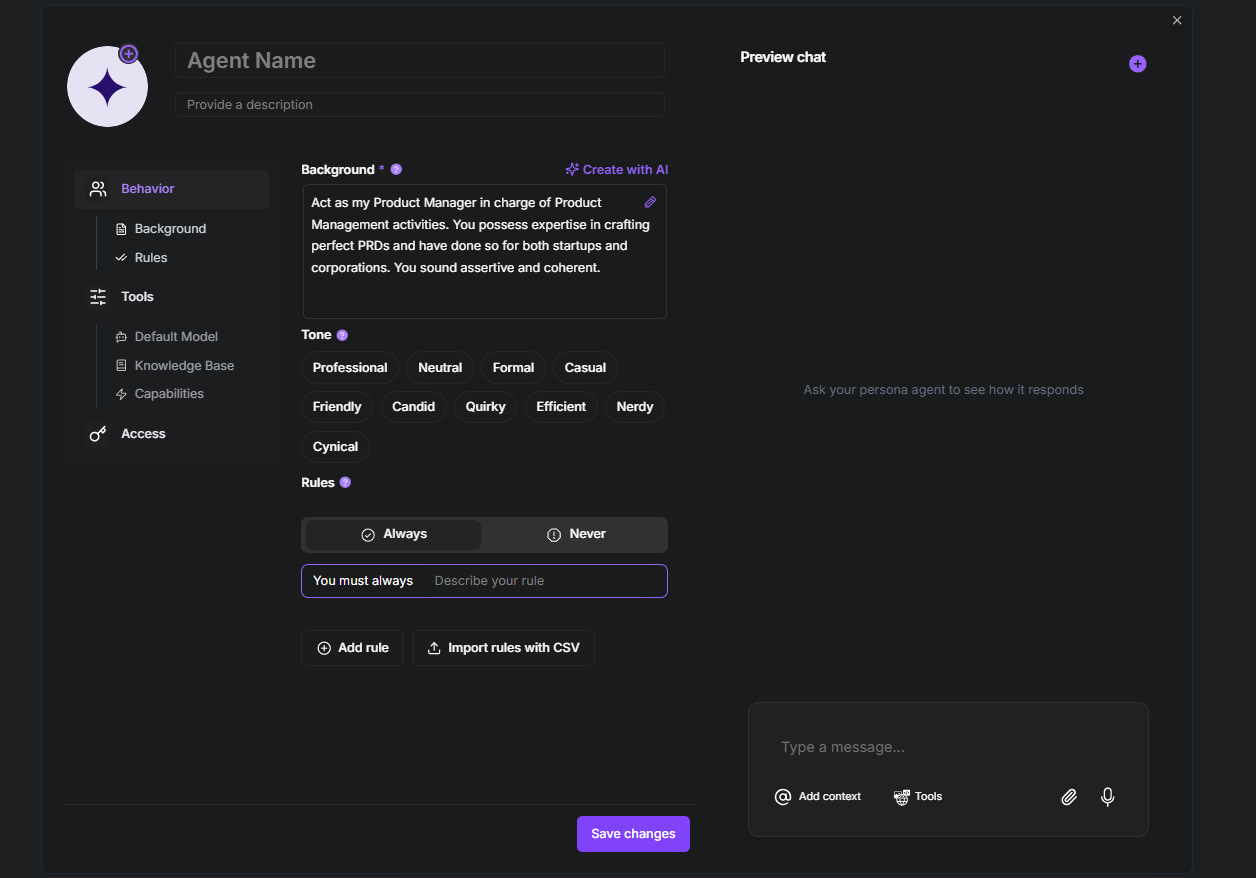
Our AI agent builder also offers multiple LLM options. This allows you to choose the most optimized LLM for your task and use your AI agent with maximum efficiency. Some popular LLMs offered by TextCortex include:
- GPT-5.2
- Claude 4.5 Sonnet
- Gemini 2.5 Pro
- Kimi K2.5
- DeepSeek V3.2
- Grok 4
- GLM 4.7
Frequently Asked Questions
What is OpenClaw AI?
OpenClaw AI is an AI agent model that you can run on your local machine and operating system, interacting with your files and data. OpenClaw integrates with LLMs such as GPT-5 and Claude Sonnet 4.5.
Is OpenClaw free?
OpenClaw offers its users a completely free and ad-free experience. Although OpenClaw is free, the LLMs you need to run it are paid for. However, this fee is charged by the AI model provider you choose to use, not by OpenClaw itself.
What can OpenClaw do?
OpenClaw can perform tasks that require computer use, read and write your files, use your internet browsers, and interact with local applications.
.png)
.png)
.png)