
In January 2026, OpenAI pulled back the curtain on one of its most practical internal builds: an in-house AI data agent designed to help employees quickly go from a messy business question to a verified data-backed answer. If you want to learn about OpenAI's in-house data agent, we've got you covered!
In this article, we will dive into OpenAI's in-house data agent and explore how it works.
Ready?
Let's dive in!
TL; DR
- OpenAI built a custom internal-only AI data agent to explore and reason over its own data platform, permissions, and workflows.
- The agent helps teams turn questions into insight in minutes across Engineering, Data Science, Finance, Go-To-Market, and Research.
- It's powered by GPT 5.2 and integrates where employees already work (Slack, web UI, IDEs, Codex CLI via MCP, and internal ChatGPT via MCP).
- The core differentiator: context layers (usage, annotations, code-derived meaning, institutional knowledge, memory, and live runtime inspection).
- If you want to build a data agent that works with your company data, TextCortex is the solution for you.
OpenAI Data Agent Review
Data runs everything: product decisions, launches, reliability, finance, growth. But the painful reality is that data-driven often turns into:
- “Which of these 12 similar tables is the real one?”
- “Why did my join silently blow up my metric?”
- “Why am I spending more time debugging SQL than answering the actual question?”
OpenAI built a solution: an internal-only AI data agent that can explore the data platform, write and run SQL, repeat the whole process when results look wrong, and explain what it did along the way.
Why OpenAI Needed a Custom Tool
OpenAI’s internal data platform serves 3.5k+ users, spans 600+ petabytes, and includes 70k datasets. At that scale, the first blocker often isn’t analysis, it’s discovery.
Even after you find a table, the second blocker is correctness:
- many-to-many joins
- filter pushdown mistakes
- null handling
- subtle semantics differences between tables that “look the same”
How Does OpenAI’s Data Agent Work?
The agent is powered by GPT-5.2 and is designed to reason directly over OpenAI’s data platform. It’s accessible across common work platforms such as Slack, web, IDEs, and MCP-connected environments (including Codex CLI and internal ChatGPT connectors). What makes it feel like a real teammate is that it can run an analysis end-to-end:
- interpret the question
- find relevant datasets/tables
- write SQL
- execute it
- validate intermediate results
- revise if something looks off
- summarize findings with assumptions + links to results
OpenAI Data Agent Structure
OpenAI built six layers of context (like a burger) to ground the agent in real organizational truth.
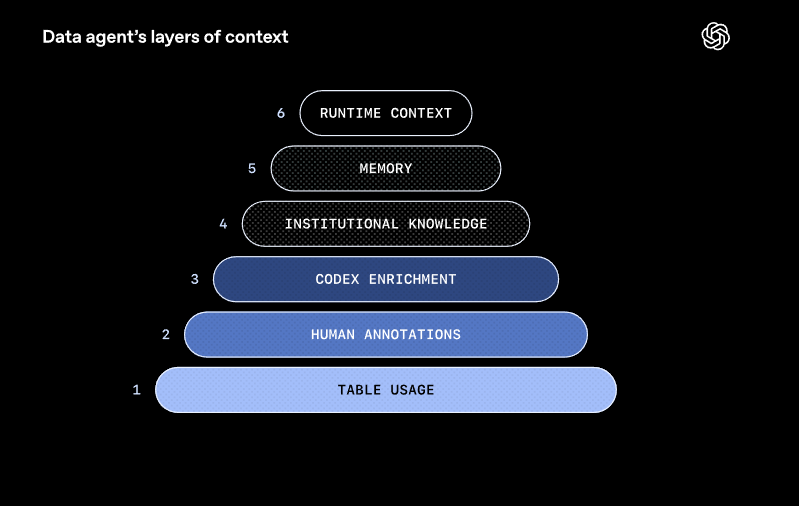
Layer 1: Table usage
Schema metadata + lineage + historical query patterns help the agent understand how tables relate and how people actually use them.
Layer 2: Human annotations
Domain experts add curated descriptions, caveats, and semantics you’ll never infer from column names alone.
Layer 3: Codex enrichment
OpenAI uses Codex to derive a code-level definition of what a table contains, how it’s derived, grain/keys, freshness, and nuances that don’t show up in SQL history.
Layer 4: Institutional knowledge
The agent can pull company context from sources like Slack, Google Docs, and Notion so it understands launches, incidents, metric definitions, and internal terminology.
Layer 5: Memory
When corrected (or when it discovers a critical nuance), it can save learnings for next time, so the same mistake doesn’t repeat forever. Memories can be global or personal and are editable.
Layer 6: Runtime context
If context is missing or stale, the agent can issue live queries to inspect schemas and validate assumptions in real time.
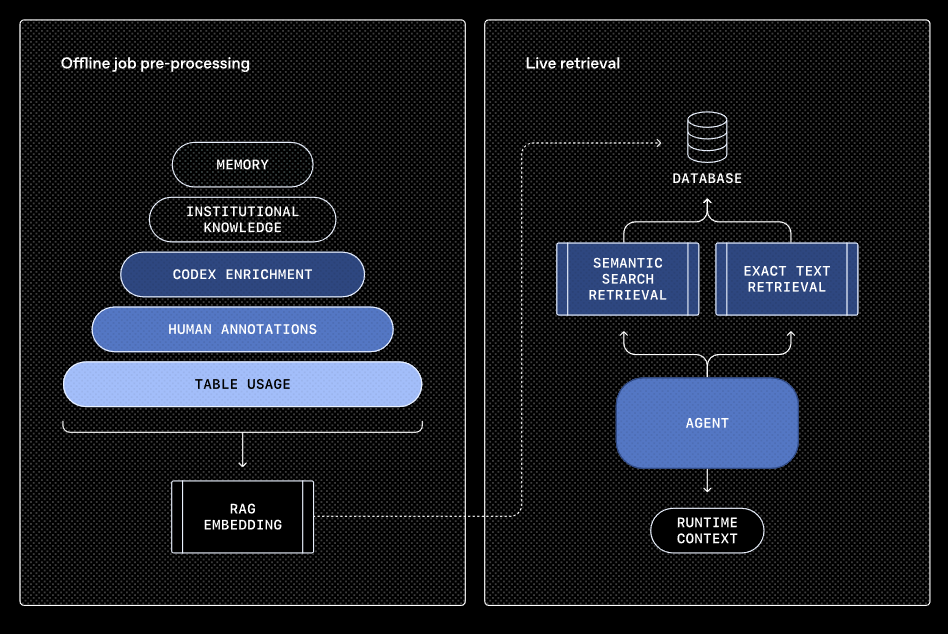
Then OpenAI runs an offline pipeline to normalize these signals, embeds them, and retrieves only the relevant context at query time via RAG—keeping latency predictable even at huge scale.
TextCortex AI - Build Your Company Data Agent in Seconds
If you need to build an in-house data agent for your company using your company data, TextCortex is the solution for you. TextCortex is a leading knowledge management and workflow automation tool that aims to automate repetitive workloads and accelerate knowledge management for its users, thus relieving employee stress.
If you're wondering how to build a data agent with TextCortex, read on!
How to Build a Data Agent via TextCortex?
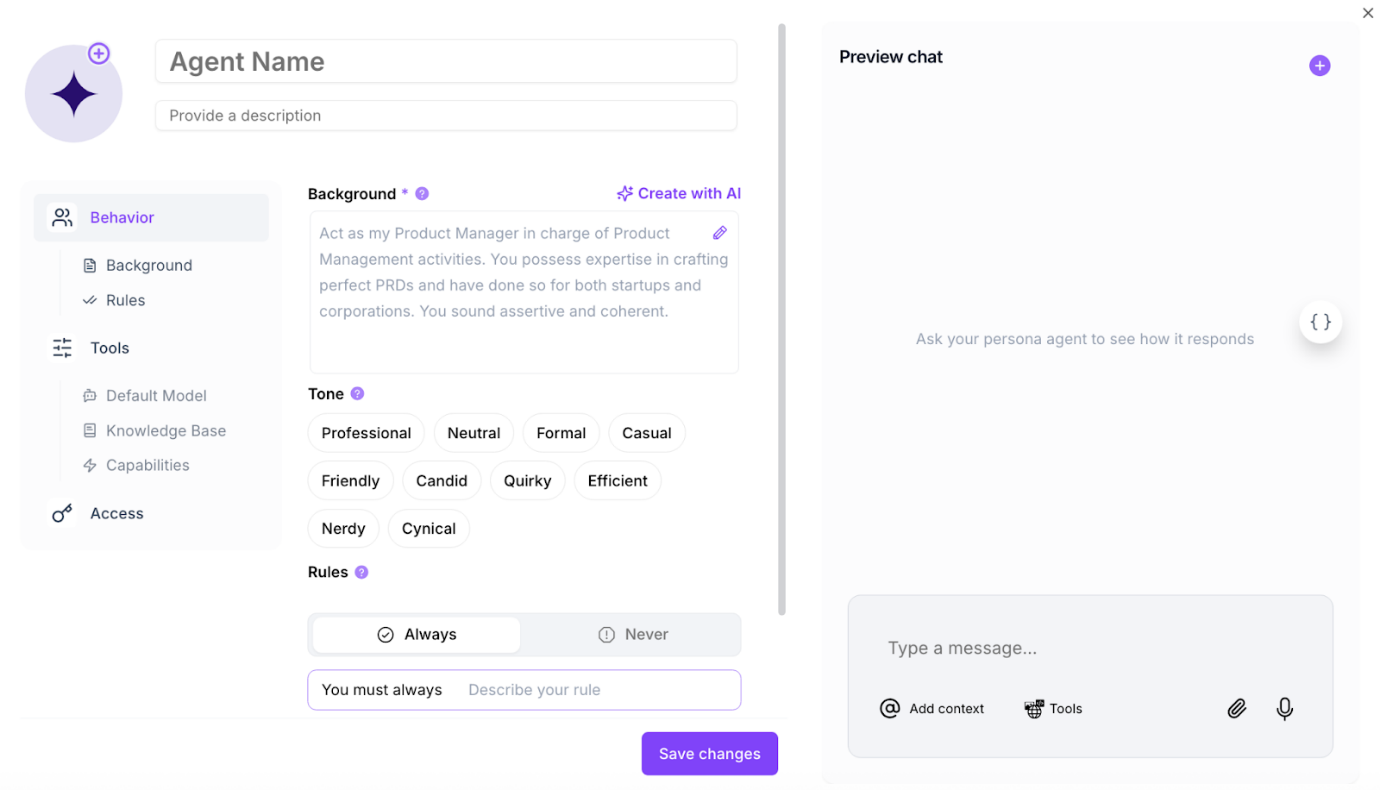
Building an AI agent with TextCortex is a simple and straightforward process. After creating your TextCortex account, you need to head to the TextCortex web application. Then, go to the "Agents" tab on the left side of the screen and hit the small "+" sign. At this stage, you can either create your AI agent manually or use the AI agent builder we've prepared by clicking the "Create with AI" button.
Manual Creation Process
If you decide to manually create your AI agent, you'll need to describe its background, choose its tones, and define the rules it should always follow and never follow. After finishing building your agent, you can use the preview chat section for a final relief check before publishing, and fine-tune your custom agent based on the outputs.
Create with AI Process
With TextCortex AI agent builder, you can build your AI agent in a conversational format. All you have to do is answer the questions the AI agent builder asks, and boom, your agent is ready to use!
Turn Your Agents into Data Agents
As you can see in the AI agent creation process, you can integrate datasets and knowledge bases into your AI agents. If you want to build an AI agent that works with your internal data, all you need to do is upload your documents to TextCortex or connect your databases, such as Google Drive, Notion, or Slack. You don't need to worry about security; all your data is protected. For more information, you can check this link.
Frequently Asked Questions
Is OpenAI’s in-house data agent available to the public?
No. It’s an internal-only tool built specifically around OpenAI’s own data, permissions, and workflows.
What model powers the agent?
OpenAI states it’s powered by GPT-5.2.
How to access OpenAI data agent?
You can access the OpenAI data agent feature through the OpenAI platform.
.png)
.png)
.png)