
.png)
OpenClaw's "skills" feature lightens the workload and allows you to automate most complex tasks. OpenClaw skills are designed to make OpenClaw AI agents more practical, modular, and robust. Instead of building automation from scratch, OpenClaw skills allow you to create specific functionalities reusable for agents. This way, you can select the functionalities you need for each AI agent from your library and use them modularly. If you're wondering what OpenClaw skills are and how they work, we've got you covered!
In this article, we will learn what the OpenClaw skill feature is and how it works.
TL: DR
- OpenClaw is an open-source, self-hosted AI agent framework that runs locally to automate tasks like email management, document analysis, and app interactions.
- OpenClaw skills are reusable “skill.md” workflow guides that teach agents how to execute specific multi-step tasks using tools like Slack, WhatsApp, and Notion.
- Skills work like modular prompt blocks (textbooks with no execution) that define agent behavior and can be reused across different agents.
- You can set up skills either manually in the OpenClaw skills workspace folder or install them from ClawHub using a simple command.
- Skills help automate complex workflows by enabling capabilities such as web search, third-party app integration, knowledge base management, and system tool use.
- If you're looking for a reliable enterprise AI platform where you can utilize your skills, TextCortex is the way to go.
What is OpenClaw?
OpenClaw is an open-source and self-hosted AI agent framework that runs on your local machine and allows you to create AI agents to automate specific tasks such as email management, document analysis, and interacting with apps like Notion, Google Drive and Slack. OpenClaw connects LLMs via other tools to perform actions automatically.

How to Access OpenClaw?
Accessing OpenClaw is a simple and straightforward process, here is how:
- Head to the OpenClaw official website
- Copy One-Liner Quick Start “npm i -g openclaw”
- Open PowerShell | for Mac/Linux open Terminal
- Enter the line “npm i -g openclaw”
What are OpenClaw skills?
OpenClaw skills are textual guides named as “skill.md” for the AI agent to learn specific workflows and connect with tools like Slack, WhatsApp, and Notion to automatically perform a task. Each skill works as a separate module, and you can install more than one skill on the same AI agent. Thus, you can automate your complex and multi step tasks with high accuracy. Some of the popular OpenClaw skill capabilities include:
- Web or Content Search
- Workflow Automation
- Third Party Ap Integration
- Knowledge Base Search and Management
- System Tool Use
- Communication Platform Integration to manage AI remote
How OpenClaw Skills Work?
OpenClaw skills are effective for automating most tasks and enhancing AI agent usage. OpenClaw skills function as textbooks that require no execution. Think of the skills feature as prompt blocks that you can use to determine how the AI agent should behave and operate. The best part about skills is that once you create them, you can use them repeatedly on different agents.
How to Set Up OpenClaw Skills
There are two methods for setting up OpenClaw skills: manually and from ClawHub. To install skills from ClawHub, you need to press Enter on the following line: “clawhub install skill-name”
If you want to install skills manually:
- Create a folder in “openclaw/workspace/skills/”
- Check what’s installed
- Restart the getaway
How to Create OpenClaw Skills?
To create an OpenClaw skill, you first need to create a skill folder. Then, create a skill.md file and start writing instructions for the agent.
Name: hello_world
Description: A simple skill that says hello.
# Hello World Skill
When the user asks for a greeting, use the `echo` tool to say
"Hello from your custom skill!".
After that, you can start adding tools or functions as needed. For example, you can use `exec` or `browser` for the agent to use existing systems. Once you create your skill, you can use it in any AI agent you build.
OpenClaw Skills Security Concerns
If you're not using a skill you created yourself, you're integrating someone else's code and instructions into your AI agent. This leads to prompt injection, the most common AI risk. The person who created the skill can write instructions for data leakage. It's especially important to ensure that the skills you use from ClawHub are trustworthy. Based on Snyk's ToxicSkills research published in February 2026, 36.82% of OpenClaw skills contain detectable security flaws.
If a skill tool is used, it can access your applications, modify your documentation, or share it with third parties. Therefore, even if it seems innocent, we recommend that you thoroughly examine the skills you use and consider the interactions between different skills.
Also, because OpenClaw offers automatic installation, it tends to automatically install skills as well. To avoid this, you can run OpenClaw in a different environment that you use solely for work, or you can opt for reliable alternatives.
TextCortex AI: Create and Deploy Your Own Skills
If you're looking for an enterprise AI assistant that lets you easily create your own skills and use them with your AI agents, then TextCortex is for you. TextCortex is a leading knowledge management and workflow automation platform that offers various utility tools such as a skills AI agent framework, connectors, and multiple LLMs and image generators.
Skills and Connectors
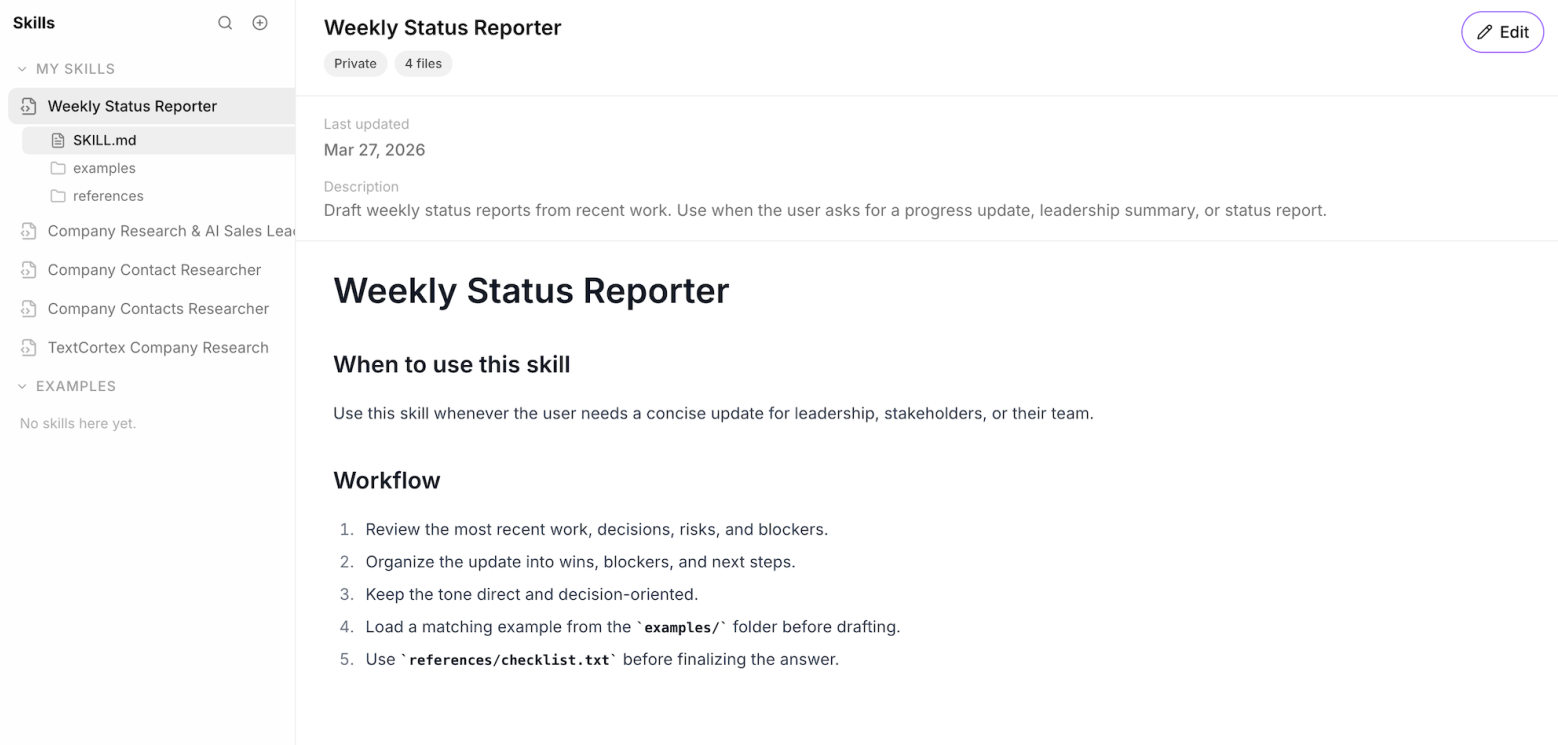
With TextCortex skills and connectors, you can create modular prompt blocks that trigger specific actions for your AI agents. If you're unsure how to create skills, TextCortex allows you to create and edit skills in a conversational format. Connectors enable you to integrate applications like Gmail into your skills and have them trigger specific actions. For example, you can create a skill that finds specific topics in your Gmail inbox and documents them. You can load the skills you create onto different agents and use them when needed.
AI Agents and Knowledge Bases
TextCortex comes with an AI agent framework that you can integrate with your skills or customize for different purposes. Furthermore, you can integrate knowledge bases containing documents you connect to or upload to your AI agents, enabling them to work with specific data.
Frequently Asked Questions
Is there an enterprise version of OpenClaw?
TextCortex is a safe and effective enterprise version of OpenClaw with its skills, connectors, AI agents, knowledge bases, web search and multiple LLMs features.
Is OpenClaw safe for enterprise use?
OpenClaw is a tool that, due to its usage and the access permissions you grant, can cause significant damage in the event of any security breach.
Can OpenClaw leak company data?
If OpenClaw has access to your company data, it risks leaking it using methods like prompt injection.
.png)
.png)
.png)